One of the strange things we have cats doing, is bringing objects from the basement up and using them as toys. Things like roofing nails (there’s a bucket of those down there), various types of electrical connectors, bolts, etc. Tissue used to bring up bullets. We never found where she was getting them, but she must have got them all, because that finally stopped.
We’ve seen several of the kittens come up from the basement and dropping things on the dining room floor. Even the Tiny Beast!
Of course, we take the stuff away as soon as we spot them. There’s a container in one of our shelves that has quite a collection, now.
With PBC in the house now, and not isolated in one room, we have the basement door closed until she and the other ladies heal up. Bonus: mo more weird metal things on the floor!
Some are not happy with that.
Yesterday, Ghosty found the container in the shelf and began violently digging into it, to reach the objects on the bottom. She had stuff flying all over the place before I could get to her and stop her. Of course, I picked up the objects she flung all around. Our lino has a very busy pattern, though. I knew it was possible I missed something. I made sure to let the family know. Especially my husband, who is almost always barefoot.
Well, I missed something.
I got up to feed the cats this morning, not bothering to put on my inside shoes.
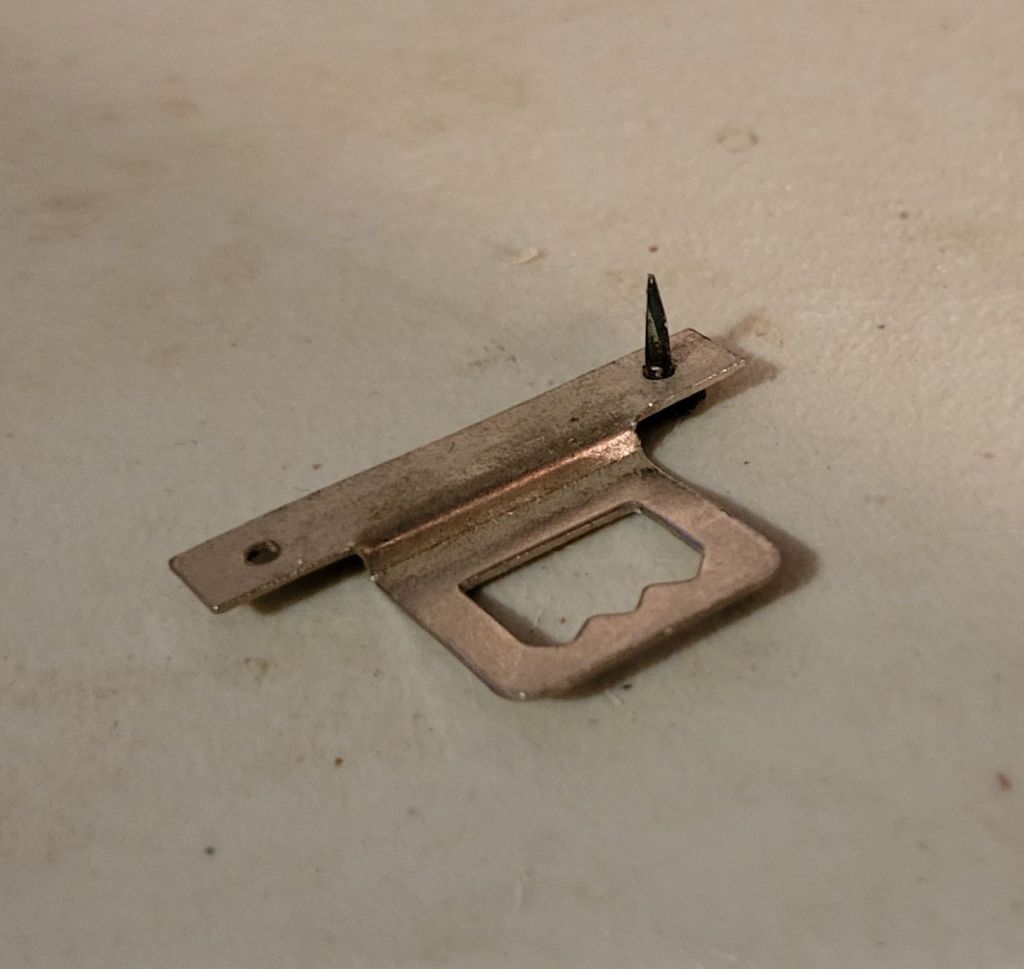
This is what I ended up pulling out of my foot.
Good grief.
Thankfully, my feet are rather calloused, so it didn’t do much damage. Still, I got the girls to feed the outside cats while I cleaned the wound.
I am now writing my first blog post on my new computer!
It WORKED!!!
It took a day and a half, and five tries at reinstalling Windows. My husband ended up creating a new recovery drive on another USB thumb drive before it finally worked.
It took a while to get that initial set up, of course, but it went through the whole thing.
Also, Windows 11 really, really wanted me to give it access to all sorts of things, then tried to sell me stuff. Granted, giving them access to things might make doing some stuff more convenient, but I’m not about to allow them access to my personal data for that.
I now have to go through what will be a long and tedious process to set everything back up again. Windows, of course, wants to us Edge as the default browser – it doesn’t come with any other – but in the data the computer repair guy saved for me on the external hard drive had a couple of browser files in my downloads. I installed that, but Firefox was not my default browser. I ended up going back to Chrome, which is where all my bookmarks are, but apparently, I don’t have the download to reinstall it anymore.
It’s going to take me weeks to get everything installed and back where I want them.
Meanwhile, the entire layout and appearance of the computer is different. Even the task bar is different.
I am not going to work on that tonight, though. I need a break.
My alarm just went off. I need to find and bring that fluffy tortie in for the night. Then I’m going to install @$%&*@#$ Alien Crossfire and de-stress with some mindless gaming.
I’ll work on it tomorrow, after I bring the cats home from the vet.
We have had repeatedly failures, trying to reinstall Windows on my new computer.
I just got this.
We got that with my old computer.
We might be dealing with a hard disk error.
My husband is setting up to try one more time.
Meanwhile, I’ve sent an email to tech support, briefly saying what’s been happening, and including this image. In their time zone, there’s a possibility I might get a call back, but if not, I won’t get a response until Monday, at the earliest.
In my email, I mentioned that, at this point, we might need to just send it back.
So we’ve tried to reinstall Windows on my new machine.
This is the farthest we got.
It would then cancel the installation, because of missing drivers.
It took a while for my husband to figure it out.
The recovery drive has Windows 10.
The new computer apparently has Windows 11.
I didn’t think it would, since it was last quality control checked before the update went out, but I guess new machines had it in advance? Who knows.
My husband’s machine is updated, so he’s wiping the recovery drive and will get Windows 11 on it.
Hopefully, that will solve the problem.
It’s now been over continuous hours, trying to get this thing up and running!
We’re pretty sure it was our Wi-Fi set up, and my logging into the Orbi network instead of the primary router that messed things up. The fact that I never got the option to log in again and select our Starlink router instead didn’t help matters.
I just got off the phone with tech support at Skytech Gaming. I ended up downloading an app to my phone that gave me a code that allowed him to see through my phone’s camera. As we were talking, the computer restarted it’s loop again, and I told him what had been going on.
As we went through the prompts, he said he was looking for logging into the internet, and that was the one thing that has never been part of the loop.
Long story short, by the end of the call, he very apologetically told me that we will have to reinstall Windows. Something went wrong in the start up and this installation got corrupted.
Which means we either hook up to another computer or get a recovery thumb drive.
*sigh*
One of the things that came with the paperwork in the box was a quality control check certificate.
The date on that is August 2, 2023. So as of then, the computer was fine.
What a pain. At least it’s a relatively easy fix, though. I’m just not sure if I want to hook up to another computer, or just get a recovery thumb drive. I like the idea of having the thumb drive. Smaller and more convenient. I’m going to have several hours after dropping the cats off at the vet tomorrow morning, so I could probably find one.
We shall see.
Not at all the sort of problem I would have anticipated!
Having said that, I can add that customer service was good and very prompt. There wasn’t much he could do over the phone, but he could at least give me a solution. With that, at least, I am happy.
I love technology, but my goodness, it doesn’t take much to mess it up!
Okay, so my new computer is still in the endless check update/just a moment…/restart/check your Wi-Fi loop.
Yes, we even have the machine hardwired to the network now, and it’s still in the loop.
I went to the website and registered my system, which gives me an extra year on the warranty. Then I went looking through their troubleshooting and support sections.
When I went to the support section, I got this pop-up.
Well now. It looks like the company with the terrible rating is NOT the company this system is from.
Also, the office the customer service number goes to is in California.
Depending on how things go, I think I’ll be calling them during office hours, tomorrow.
My husband has suggested I serve my computer up on his desk in the living room. That’s his leatherworking station. It’s covered with stuff I’d have to clear off, first. Then I’d have to dismantle my entire computer system and carry it over, hopefully without letting cats through, then setting it up again – with no way of knowing if it would make any difference until I restart the computer again.
Well, I have my new computer. It’s all hooked up, set up and I’m going through the first start up process.
Which has been going on for about 2 hours, now.
I seem to be stuck in to very slow loop.
It’s gone through the process of selecting language, country, keyboard, and time zone. At the beginning, I also had to log into our wifi.
I think that’s where I made my mistake.
The default option was our Netgear system, which boosts our wifi through the house. In my corner where I have set up my office, the log walls interfere with the signal, so I also have a wifi booster. Plus, my old computer had wifi antenna that my husband installed for me.
This computer came with wifi antenna, so that’s taken care of.
Anyhow, once the basics are set up, the system then goes to “checking for updates”, followed by a display of “just a moment…”
All of which takes several minutes. Especially the “Just a moment…” screen.
Then it restarts itself.
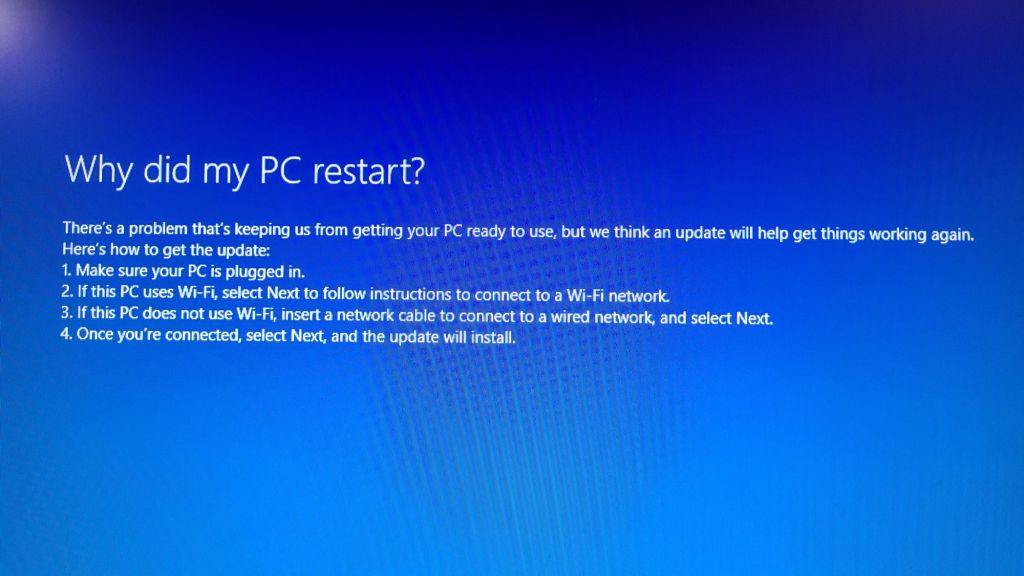
After the restart, it goes back to selecting country, language, etc., then I get this.
Well, obviously, the PC is plugged in, or this wouldn’t be showing at all.
The following options then all say to select “next”. I font get any instructions to connect to wifi, as it says in number 2. So it acts as if I’m at number 3.
If I hit “next”, though, it goes to “checking for updates”, and the loop continues.
Yes, I even tried a hard shut down. When I r4started, it went straight to the “choose your country” screen, and is now back at the “checking for updates” screen again.
We may have to dig up a cable to hook up to the router physically, because it seems to not be able to hook up to the wifi.
With my old computer, for some reason, it would no longer allow me to save the password to connect to the Omnii netgear booster. I would just connect automatically to our Starlink router directly. If the signal got too weak, I could log into the booster, but if I lost signal there for some reason, it want back to the default and logged me in. It couldn’t log me into the booster, because the password had to be manually input.
With the new computer, I never had a chance to put in the password for both. Just for the booster.
Which is not part of the loop I’m stuck in.
Oh, look. It’s restarting again.
My husband is now looking for the cable. Hopefully, it’s long enough to reach across the house.
Which I’m both happy and sad about, since it meant he’s basically maxed out his new credit card. Which means, after he gets his eyes tested later this month, he won’t be able to get new glasses.
So we’ll be working on paying that down as quickly as possible!!! I’ll be getting a caregiver tax credit that I was going to put towards his glasses, anyhow, so that’s going to his credit card.
I’ll be getting a SkyTech mini-gaming computer. Since I will be doing more photo and video work, a gaming computer will have the system requirements I need. A few things will probably need upgrading; it has only 500gigs of memory storage, for example. My current computer has 1.79T, plus I have a 3T external hard drive – which I currently can’t access on my current machine. But that’s easy enough to work around. The important part is having a machine that actually works!
Speaking of which…
I’ve downloaded a free version of the Advanced Systemcare software recommended to me, and have been trying to install it.
The installation bar shows it at what looks like 99% installed, and it’s been like that for over 10 minutes now.
The order for the new computer has just been placed, so we don’t have an estimated delivery date yet. Hopefully, it won’t take long. The way things are going, I won’t be surprised if this thing starts smoking or something!
This morning, I did remember to grab some meat out of the freezer to drop off at my mother’s on the way to the city. I called her ahead of time, but only left a message, as she would have gone to bed again, after taking her morning meds.
I was supposed to just drop things off and go, but of course, it never quite works out that way! 😁
As I put the meat in her freezer, I showed her what I’d brought for her. Her response was to say, too bad I didn’t bring her any milk.
*sigh*
Then she started talking about my being on the way home, which confused me. It was shortly after 10 when I got to her place. For me to be on the way home, I would have had to leave early enough to get to Costco just as they opened, rushed through my shopping, and done nothing else at all. Plus, I’d even told her several times already, I was on my way to the city. I think because our vandal has stopped at her place on the way home from Costco in the past, she got it in her mind that that’s the only time anyone would stop by at her place. Personally, I’m not into having my frozen stuff thawing out in the vehicle any longer than I have to!
I did offer to go get some milk for her right away, but she insisted that no, she didn’t want to trouble me. I’ve got so much to do, so much trouble to deal with… ???
It was literally the most convenient time to do it, but nope.
Looks like I’ll be popping over to her place in the next day or two, do help her with her grocery shopping.
Before I left, my mother mentioned getting confusing messages on her answering machine, so of course I checked that right away!
I was just as confused as she was with two of them.
One was a very brief and cheerful greeting – at least I think it was a greeting, it was spoken so quickly – followed by a hang up. Male voice. Strong Middle Eastern type accent. No name left, and clue who it could have been. The other was a female voice leaving a much longer message. Strong European accent, fast talking, neither of us could follow what she was saying. My mother didn’t recognize the voice (she gets phone calls from Poland, and this was not from one of her relatives).
So I left those messages to listen to again later, when I had more time to try and figure them out.
Curious, I decided to check the caller ID to see if the numbers could tell me anything.
They didn’t, but there was a familiar number, right after mine from when I called this morning.
I double checked to be sure.
It was our vandal’s number.
My mother’s phone gives the time a call came in, but not the date, which is frustrating, but my mother was surprised it was there. I explained to her that our vandal’s number has been blocked, to stop his abusive calls. Clearly, the call blocking device worked, but I did not expect his number to still show up on caller ID. Knowing this, I warned her that, after not getting through to her, he might simply show up at her door. She started going on about what a great visit she had with him and his wife that last time he did that. I told her, that’s because his wife was there. If he brings a witness, he’s going to be on his best behaviour, putting on a performance. That way, later on, his witnesses can say how well they get along, etc. As if that would somehow make up for more than a decade of abusive phone calls, messages and visits! My mother actually seemed to get it, right away, which is encouraging.
Then it was time for me to continue to the city. My first stop was at a Canadian Tire to get the litter pellets. I noticed the oil pressure gauge was dropping a lot, so when I got there, I asked how much an oil change would cost, juggled some numbers, and was able to get the truck in right away.
I got a package deal that included 5L of oil, tire rotation, inspection of the brake, cooling, exhaust and suspensions systems, a lights check, lubrication of the door locks and hinges, battery test, and a fluids top up – washer, brake, power steering and coolant. The truck is a 5.6L, so I did get charged for an extra litre of oil, but they had a weekly special going on that gave me 15% off, so in the end, the whole thing cost me just under $80.
I did make sure to let them know that there are a number of codes coming up that I am aware of, and am taking care of little by little.
They were able to take the truck in right away, but I still had more than enough time to do the shopping I needed. Along with 2 bags of litter pellets, I ended up getting another bag of seed starting mix, and some seed starting trays with larger, deeper cells in them. I only got two to try out. One of things I think was an issue last year was trying to start some of our seeds in the smaller Jiffy pellets. I considered getting a seed starting set with the big Jiffy pellets, but decided against it when I saw the other trays. We will be starting some eggplants and peppers soon.
After getting all that, I still had a while to wait. Shortly before it was done, I was called over to talk about some of the things found in the inspection. One was a burnt out license plate light, which I knew about. There’s two of them, and one is still working. It turns out that having just one burnt out bulb can get me a ticket. That’s something we can do ourselves. Another thing was a recommendation to do a power steering fluid flush in the near future. The last one was one I’ll definitely talk to our mechanic about, first. It seems one of the bearings on the front driver’s side tire is starting to show a little play.
If I were to get all the recommended work done right away, the final bill would be over $600.
Uhm… no.
I told him, I don’t live in the city, and I’ll talk to our regular mechanic about this.
Here’s the thing.
While I don’t mind going to Canadian Tire for something as basic as an oil change, I won’t go there for any other work. We’ve been burned badly by them in the past, even in other provinces, before we knew how notorious they are for “finding” extra work. It would be a very long story to tell how badly we got screwed over in the past. It was a long time ago, but their reputation has not improved over the years. Unless I know exactly what is going to be done, in every detail, I will not go to them again for mechanical work.
I did remember to ask how the tires were rotated, though. I explained that one tire needed to have its valve replaced, so I needed to know if they did a front to back rotation, or an X rotation. So he checked that for me, and it was front to back.
That done, my next stop was gas at Costco. Their price for regular is 113.9/L right now (122.9 or 123.9/L everywhere else). Half a tank cost me just under $55.
From there, I finally got into Costco to do the shopping.
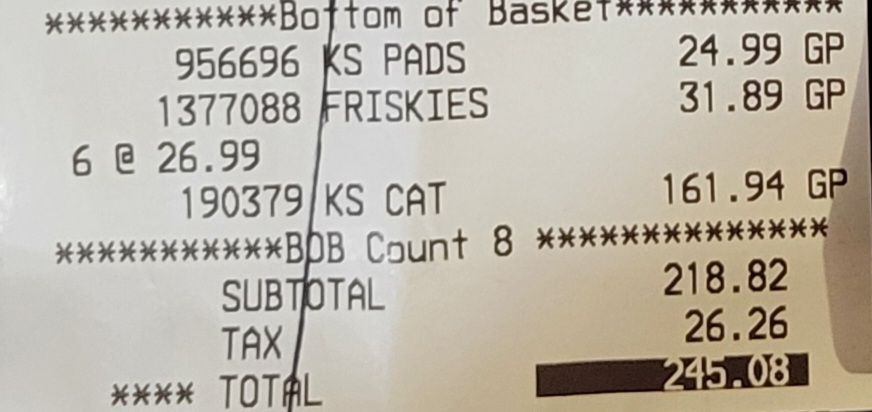
I got a separate bill for the cat supplies, but altogether, this is what $532.56 looks like.
The pet supplies cost almost as much as the stuff we got for ourselves.
We got more pee pads – those have been coming in remarkably handy – a case of canned cat food and six 9kg bags of dry cat food, for a grand total of $245.08
Then there was the stuff for us.
Gosh, some of those item names are hard to figure out at times!
We got a case of Coke Zero for my husband, the big Kirkland package of toilet paper, 5 pounds of butter, a 6 pack of pasta, a bag of Basmati rice, two flats of eggs, a big bag of walnuts, 3 packages of tortilla wraps, a big box of Ramen noodles, two 2 packs of Asian Cashew salad mixes, a round of Brie, a 2pk of goat cheese, mini portabella mushrooms, a block of Old cheddar, a big jar of mayonnaise and another of peanut butter, and finally a couple of bottles of painkillers; ibuprofen for the girls, and acetaminophen for me. This time, not Tylenol Arthritis, which does absolutely nothing for my arthritis. Just generic extra strength acetaminophen.
Oh, I almost forgot. I got a fresh, heat and eat lasagna for supper.
Which the girls have heated up and is waiting for me right now! I didn’t realize it, but my older daughter and my husband don’t eat lasagna anymore. All that cheese does nasty things to their insides, and we’re out of lactase. So they made something else, and my younger daughter and I get to enjoy the lasagna all to ourselves! 😁😁
I have to remember to call my mother later on, though, and figure out when I’m coming over to help her with her shopping.









 The Re-Farmer