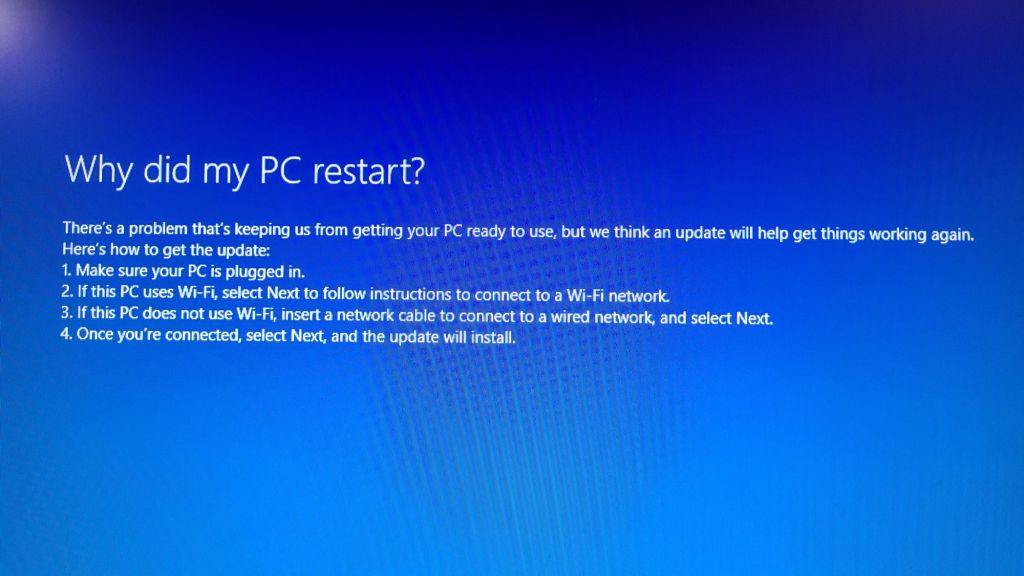
Okay, so my new computer is still in the endless check update/just a moment…/restart/check your Wi-Fi loop.
Yes, we even have the machine hardwired to the network now, and it’s still in the loop.
I went to the website and registered my system, which gives me an extra year on the warranty. Then I went looking through their troubleshooting and support sections.
When I went to the support section, I got this pop-up.
Well now. It looks like the company with the terrible rating is NOT the company this system is from.
Also, the office the customer service number goes to is in California.
Depending on how things go, I think I’ll be calling them during office hours, tomorrow.
My husband has suggested I serve my computer up on his desk in the living room. That’s his leatherworking station. It’s covered with stuff I’d have to clear off, first. Then I’d have to dismantle my entire computer system and carry it over, hopefully without letting cats through, then setting it up again – with no way of knowing if it would make any difference until I restart the computer again.
Well, I have my new computer. It’s all hooked up, set up and I’m going through the first start up process.
Which has been going on for about 2 hours, now.
I seem to be stuck in to very slow loop.
It’s gone through the process of selecting language, country, keyboard, and time zone. At the beginning, I also had to log into our wifi.
I think that’s where I made my mistake.
The default option was our Netgear system, which boosts our wifi through the house. In my corner where I have set up my office, the log walls interfere with the signal, so I also have a wifi booster. Plus, my old computer had wifi antenna that my husband installed for me.
This computer came with wifi antenna, so that’s taken care of.
Anyhow, once the basics are set up, the system then goes to “checking for updates”, followed by a display of “just a moment…”
All of which takes several minutes. Especially the “Just a moment…” screen.
Then it restarts itself.
After the restart, it goes back to selecting country, language, etc., then I get this.
Well, obviously, the PC is plugged in, or this wouldn’t be showing at all.
The following options then all say to select “next”. I font get any instructions to connect to wifi, as it says in number 2. So it acts as if I’m at number 3.
If I hit “next”, though, it goes to “checking for updates”, and the loop continues.
Yes, I even tried a hard shut down. When I r4started, it went straight to the “choose your country” screen, and is now back at the “checking for updates” screen again.
We may have to dig up a cable to hook up to the router physically, because it seems to not be able to hook up to the wifi.
With my old computer, for some reason, it would no longer allow me to save the password to connect to the Omnii netgear booster. I would just connect automatically to our Starlink router directly. If the signal got too weak, I could log into the booster, but if I lost signal there for some reason, it want back to the default and logged me in. It couldn’t log me into the booster, because the password had to be manually input.
With the new computer, I never had a chance to put in the password for both. Just for the booster.
Which is not part of the loop I’m stuck in.
Oh, look. It’s restarting again.
My husband is now looking for the cable. Hopefully, it’s long enough to reach across the house.
While I am using my phone to make this post, because I can’t do anything with photos on my desktop, this might be the last post where this is an issue.
My new computer is ready to be picked up at the post office.
Unfortunately, I can’t get there before it closes over the lunch period. It reopens at 2, so I’ll head our then. After that, we’ll see how long it takes to set it up and see how it works. It will take a long time to set up or transfer my data over, but I should at least be able to go online and write posts.
I really hope this turns out to be a good machine.
In other things, cat related.
I’ve been chatting with the Cat Lady. They now have several cats from us, living with them permanently. They have pretty much all had weird health issues. Thankfully, Cabbages is now hale and hearty. Leo – a kitten we never named and never expected to survive – had lung issues but is now officially declared healed.
Then there is Muffin, a muted calico that was supposed to be adopted out, but bonded instantly with her husband. For some reason, she hates the Cat Lady, but gets along with everyone else. She also goes to job sites and coffee runs with her husband!
Well, one day, while the family was out of country, her mother, who was taking care of the cats while they were gone, found her with a bloody mouth. After an emergency weekend trip to the dentist, she had some teeth removed.
Since then, they got a diagnosis of stomatitis. She’s going to need all her teeth removed. !!!
Telling my daughters about this, they told me of a cat they follow online (Yes, a cat; not the owner!) that had all her teeth removed a couple of years ago. Apparently, cats can handle being gummies just fine. So hopefully, things will work out for Muffin.
I shared this with the Cat Lady, along with mentioning how we feel so bad that she has all these cats from us that turned out to have major health problems. She told me it was okay. Other cats they’ve found themselves with have been much more difficult. And she wasn’t talking about the one that was do physically abused, he can no longer eat without help, and had to have a leg and tail amputated.
Which is rather alarming!
Then she got back to me later, after talking to someone with 41 cats, wants to adopt some out and get some of them fixed.
Just some?
The Cat Lady says she is getting so tired of dealing with the public, she just wants to focus on us and our cats.
What does that say about the other situations she deals with, when ours is the least problematic??
Speaking of which…
We have a problem with Driver.
A couple of days ago, he seemed to be limping on a back leg. I wanted to keep an eye on him, but yesterday, I never saw him walking. While feeding them, he was in the cat bed under the platform in the sun room, and didn’t get up. When I came back after finishing my rounds, he was gone. Checking through the bathroom window during the night, though, I spotted him on the top shelf by the window. I figured if he could get up there, he was doing alright, or at least improving.
This morning, however, he was walking around on 3 legs, holding a front paw off the ground.
About the only positive thing I can say is that the leg isn’t dangling. With Ginger and with Toni, when I saw how their legs were dangling and flopping around, I knew right away, amputation would be the most likely recommended course of action. With Driver, however, he’s holding the leg up, but there is nothing swinging around or flopping. As I had not noticed him favoring his front leg before, this may even be a new injury he somehow got last night.
The last I saw him, he was disappearing under the storage house. I wasn’t even allowed to get close to him, never mind pet him, which is now unusual for him.
The problem is, we can’t even take him to a vet. With the spay day coming up this weekend, plus expenses like the new computer, expecting new glasses for my husband, etc, we just don’t have any more budget left for vet bills. I’ve told the Cat Lady about it, but not with any expectation that they should take in the expenses.
We have had cats show up favoring paws or legs before, that healed on their own. We will watch closely. Hopefully, it’s not anything serious, but at the moment, I can’t get close enough to check.
Which I’m both happy and sad about, since it meant he’s basically maxed out his new credit card. Which means, after he gets his eyes tested later this month, he won’t be able to get new glasses.
So we’ll be working on paying that down as quickly as possible!!! I’ll be getting a caregiver tax credit that I was going to put towards his glasses, anyhow, so that’s going to his credit card.
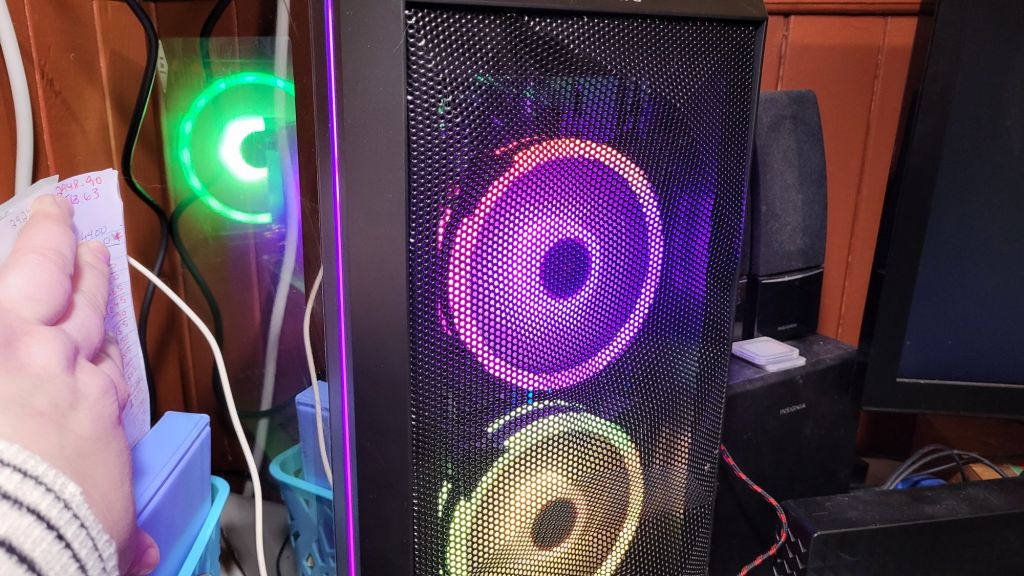
I’ll be getting a SkyTech mini-gaming computer. Since I will be doing more photo and video work, a gaming computer will have the system requirements I need. A few things will probably need upgrading; it has only 500gigs of memory storage, for example. My current computer has 1.79T, plus I have a 3T external hard drive – which I currently can’t access on my current machine. But that’s easy enough to work around. The important part is having a machine that actually works!
Speaking of which…
I’ve downloaded a free version of the Advanced Systemcare software recommended to me, and have been trying to install it.
The installation bar shows it at what looks like 99% installed, and it’s been like that for over 10 minutes now.
The order for the new computer has just been placed, so we don’t have an estimated delivery date yet. Hopefully, it won’t take long. The way things are going, I won’t be surprised if this thing starts smoking or something!
I popped outside briefly last night, when raccoons showed up in the sun room again. It was raining ever to lightly at the time.
By morning, we were still above zero, with a light fog. Things are pretty wet and slippery put there!
We’ve got the “moat” forming around the garage – something more typical or March or April.
That didn’t stop Driver from following me around and demanding attention! He kept flopping in front of my feet, until I finally picked him up and carried him.
I managed a head count this morning. The cats still aren’t all back to using the sunroom at night, but I think I counted 35 this morning!
Meanwhile…
I am having major computer issues again.
I tried using my movie making software last night. I finally started seeds and was going to make a quick little silent video.
The computer started making grinding noises.
As the noises got worse, I tried shutting down the machine, but it wouldn’t shut down. After numerous attempts, I finally did a hard shut down and tried again, after waiting the 20 minutes or more it takes to boot up now.
After doing a few things to make sure it was functioning, I tried the movie making software again. As I was going through Windows Explorer to find some images to include, it started locking up on me.
Oh, and I can’t see my external hard drive, where i have been moving my photos and video to conserve space.
When I tried navigating around WE, it started “not responding” on me. Of course, with WE, you can’t just End Task it. The only option is to restart it.
Which locked up even worse. I got a white screen that wouldn’t go away.
After having to do hard shut downs several times, I called it a night.
This morning, I tried turning on my computer.
It wouldn’t boot up.
After having to do a couple of hard shut downs, I got the dreaded blue screen, and the “this device needs repair” message.
Much to my surprise, though, I was able to go through the prompts and get it started! While I’ve been tapping this on my phone, it managed to finish booting up.
Meanwhile, my husband has been looking up computers on Amazon for me. Not that we can afford one that has what I need. He was even looking at ones with payment plans, but those were even out of budget.
As much as I love the truck, the payments we ended up with were over budget, and that’s really affecting what other things we can do.
Last night, the fog rolled in. It was weird to see it rolling in on the garage cam live feed. The road and field beyond the gate was glowing! Really amazing to see.
It was still quite heavy this morning. The trees were covered in hoarfrost and looking gorgeous. Even Driver’s long black fur had hoarfrost on it!
I was 99% sure that my husband’s CPP Disability would come in today. It would normally come in on the third last business day of the month, but if that falls on a Monday, the funds get deposited on Saturday, which is what happened today. His private insurance disability payments, which comes in on the last business day of the month, also gets deposited on the Saturday, if that last business day falls on a Monday. It wasn’t always like this, but I’m not entirely sure when it changed!
No complaints, though. It meant I could go into the city and do the first stock up shopping trip – and finally pick up my desktop computer from the repair shop!
Yes, I am finally typing this post out on my computer, using my ergonomic keyboard and my nice big monitor!
This is soooo much better than using my phone!!!!
Getting my computer was not my first stop off the day, though.
I left pretty much as soon as I was done my morning rounds, so things were still quite densely foggy out. It got denser the closer I got to my mother’s town, where I stopped briefly at the gas station. Her town was so thickly covered in fog, it was hard to see the turn off to the gas station! I didn’t actually want to get gas, as the prices there have gone up to 123.9/L (122.9 in the city), and I was planning to fill the tank at Costco, but I had someone tailgating me in the fog, and I wanted to get him off my a$$!
For this trip, we decided not to do the Costco shopping, but the “little” shopping, and save the Costco trip for when main pay comes in next week. My first stop was at the international grocery store. There were a few things we wanted to get there that we don’t find anywhere else, plus I was planning to have breakfast there.
Sadly, I was a bit too early for dim sum or the Chinese buffet. There was none set up, yet. The self serve chicken wing and pierogi bars were open, though, so I picked up some hot food there. I was just going to get a variety of wings at first, but all but one type were spicy hot, which I can’t tolerate😭so I got some pierogi and sausage.
It was disappointing. None of it was out there long enough to be fully hot, yet. It was just barely warm.
Note for future reference. Don’t leave home before 9am, if I plan to get breakfast at the international grocery store!
With a variety of these buffet items, sold by weight, plus a drink, my breakfast cost about $15. Not too bad. Dim sum would have cost more, but would have been worth it!
It turned out to be a good day to shop in this store, as they had some really good sales on, so I got more of what was on my list than what was specifically for this store.
I realized I forgot to take a picture of my cart only after I left for the computer store, so… this is what bagged up $187.37 looks like.
Normally, I would have picked up the paper products at Walmart or Superstore (I ended up not going to Superstore), but the toilet paper, paper towels and facial tissue were all on sale. I’ll still get more TP at Costco, but extra toilet paper is never a bad thing!
That gallon jug had been on the other side of the red bag, but I had to brake harder than usual as I drove to the computer shop, and it went flying to the front of the truck box! It’s a good thing I keep that garden cultivator tool in the stuck, as I had to use it to retrieve it!
The gallon jug is a soy beverage my daughters requested. One of those items we don’t find anywhere else. In the hard sided bags, we have: avocados (bag of 4), bananas, 2 clamshell packages of blueberries, 3 Saskatoon and 3 Citrus Beaver Buzz, blocks of marble, Old cheddar, Extra Old and Old White cheddar (they were 50% off), two different flavours of coffee creamers, rice vinegar, seasoned rice vinegar, two different flavours of frozen dumplings, smoke bacon (slab, not sliced), Sockeye salmon fillets (package of 2 big fillets for $20, which is an unusually low price for salmon), frozen cooked prawns, Bergamot Earl Grey tea, powdered milk and dental floss picks.
All of which fit into those two bags and cost almost $200 – and that’s with almost $30 off for the various sales. *sigh*
Then it was time to get my computer.
The computer did not get repaired. He got it running again, but for the cost of replacing everything that needs to be replaced, it would be better to get a new machine. So I was charged for the diagnosis, not any repair. That was about $60. He was able to do a “premium” data save, which was almost $80, plus I got at 2T external hard drive to put the data on. That was just over $110. After taxes, the bill came to $280 and change.
Ouch.
I’ll get to how things are with the computer, later.
Costco is pretty much across the street, so gas at Costco was my next stop. I was at just over half a tank. Costco’s price was 114.9/L, and a fill cost me $56.89 Much better than if I’d filled anywhere else!
From there, I went to Walmart. This is what $264.90 looks like.
*sigh*
Those three bags of cat food are 10kg bags, and they cost $32.97 each. The canned cat food cost $28.77 each.
Besides food for the cats, I got a family pack of breakfast sausages and a family pack of pork chops. There’s 2 loaves of rye bread, a 2L of soy milk for the girls, a large jar of olives, 2 bottles of hydrogen peroxide for shocking the hot water tank, and a new toilet roll holder, because the cats knocked over and broke the one we had before. Plus a bottle of water for the drive home.
That’s 17 items for almost $260.
*sigh*
So the groceries cost $452.27 altogether, plus the computer, lunch and gas, which means I spent over $800 in total just today. I decided I didn’t want to go to the Superstore and spend more money! The rest of the stuff on my list can wait until the Costco trip.
And to think, by doing these stock up trips to the city, then buying mostly fresh stuff locally, we’re saving at least a couple hundred dollars a month. The big difference in cost is with the cat food. Those 10kg bags – if we can find bags that size in the first place – cost about $45 each locally. A 7kg bag will cost about $32 locally – and that’s going with the cheap brands (not too cheap, as the quality is so bad with those).
We’re also going to be increasing the amount of wet cat food we’re giving the inside cats. The outside cats can supplement with hunting (no mouse problems here!), but the inside cats can’t. I think the ratio of dry:wet cat food is causing problems with some of the cats. Our vet budget is going to spays and neuters right now, so we can’t afford any sick cats!
Speaking of which…
I’ve been chatting with the Cat Lady. She has some donated items for us that will be passed on when we meet up on Feb. 10 for the cheap spay/neuter day. She has us booked for 5 cats. We have three inside cats to do, plus we should be able to grab the fluffy tortie from outside, plus one outside male. Hopefully, Shop Towel. The Cat Lady will be paying for two of them. She was talking to the lady who is donating the cat supplies, having just lost her cat of many years, that will be passed on to us. After being told about how we’re taking care of so many cats, she donated enough funds to cover another spay! That was so sweet of her!
Okay, back to the topic at hand!
Once at home with the shopping and everything was brought in, we let the computer warm up to room temperature before turning it on.
The first time, it wouldn’t boot. I had to do a hard shut down and tried again. After letting it spin for almost half an hour, I had to do another hard shut down. After talking to my husband about it, he asked if I’d tried his power cord, which he’d leant me to try before we took my tower into the stop. It turned out, that’s the one I was using. I found my original power cord and tried again.
This time, it actually booted up!
It took almost half an hour to finish booting up, but it did finally happen!
Everything is sooooo slow to open right now. At this point, I’m not sure I dare shut if off anymore, given the crunchy noises I was hearing from the hard drive the first time I tried turning it on.
The main thing is that it’s running right now. I don’t know how much time I’ll get out of it before it finally dies, but hopefully not before we are able to set some funds aside and find a refurbished computer! Or maybe find somewhere with a payment plan.
This machine is on borrowed time, but there are so many other things pulling at the budget – a much tighter budget, not just because of increased costs of everything, but because we have truck payments that have taken up pretty much all our unallocated funds.
Thank God my husband’s private insurance was such a good plan. Who ever thinks they’d ever need to go on disability? We can still get by.
Okay, we’d be getting by a lot better if we weren’t buying so much cat food! But that’s a choice we’ve made, so nothing we can complain about.
All right now. Time to finish this off and really put this computer to the test. I’ve got trail cam files to upload!
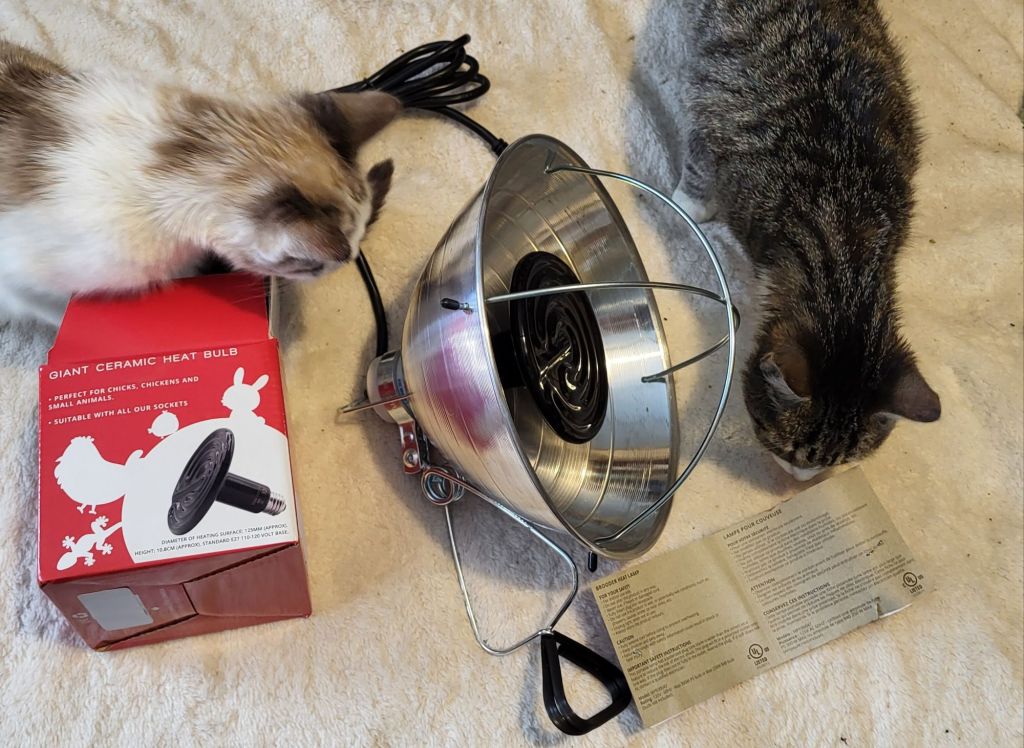
I just got back from the post office and brought this home. The heat lamp for the sun room. It’s assembled and ready to hang up. I’m going to let it all come to room temperature before I try to hang it up and turn it on.
This is much better than what we used before, which was never intended to be used for anything other than keeping the pipes under the kitchen sink from freezing. This is a brooder lamp, so it’s meant to keep critters warm, safely. The bulb guard being particularly appreciated. Sure, a cat could still stick it’s head in, though I’ll be sure to hang it where that is not likely to happen. More likely is an accidental brushing. Between the bulb guard and the depth of the reflective shade, that is no longer a concern.
There is the option to hang it from a hook, or using a clamp. I expect to be using the clamp, but it’s good to have choices.
We are not expected to have daytime highs below -20C for a while yet, but overnight lows have already dropped to that point. The city we lived in last is expecting to drop colder than -30C, so we don’t have much to complain about.
In other news, I got a voice mail on my cell phone. It never rang, but at least it took a message.
It was the computer repair place, letting me know my machine is ready to pick up.
!!!
I had thought it was a lost cause, but no. He got it going. It takes about 5 minutes to boot up (it was taking that long for a while, now), but it’s working again. The total bill, including saving and backing up my data, is almost $300. Much cheaper than a new computer!
I do still need a new computer. The hardware is giving out and it’s not worth replacing it all, but it does give us time to figure out getting the funds for a new machine. Or even a refurbished one.
I don’t know when we’ll be going into the city next, to pick it up. That gives us time to scrape the money together to pay for it.
Then there is the cost of replacing the valve stems on the truck.
Then there is getting my mother’s car in to see what the damage is, and how much it will cost to fix.
My husband has an eye appointment coming up and will need new glasses. The last time he got glasses, it cost over $1500, most of it for his special lenses, some 15 or so years ago. His insurance currently covers only about $400.
Then there is…
Then there is…
Then there is…
It just doesn’t end, does it?
However, the kitties will be nice and warm. I think the lamp is ready to hang up, now!
Okay, I have to admit, I was expecting this. I was hoping to avoid it, but I knew it was coming.
I just got off the phone with the computer repair shop.
Good news is, all my data has been saved. No loss there.
The bad news…
My computer isn’t worth fixing.
He did manage to get it started, but right off the hop, I need a new hard drive.
And a new power supply.
Plus, other things are starting to go.
I’ve been hearing that from my machine for quite some time. Honestly, I’m amazed it didn’t die earlier.
It’s just old. He could fix the main things, but I would be on borrowed time. Plus, Windows 11 is coming, and my machine is not going to handle that well. It’s simply not worth the cost of repair.
So when I’m in the city again, I’ll get my data and a new external hard drive to store it on, since there is not enough space left on the external hard drive I have at home. I’ve been looking at new PCs, but they are all insanely beyond our budget, to get a system that meets my needs.
However, we might be able to swing a refurbished machine. I don’t know. When I pick up my data, we can talk shop.
On the way to the city, I took a side trip to the clinic to get some scheduled bloodwork done. It was awesome to go to the reception desk and find the plastic wall gone. I just had to comment on it, saying, I can hear!! One of the receptionists, who knows me by now, was absolutely giddy about it!
She found my requisition on file and printed it out for me, and didn’t have to push it through a slot. 😁 The staff is so happy.
Then I walked across to the lab and their reception. Where I had to pass things around a barrier, and stick my ear around it to hear and confirm I was fasting. One guy was wearing a mask, still.
I got sent straight to a room, though, and he very quickly took some blood, and I was on my way!
I’d made plans to meet my SIL to break my fast, so I messaged her to let her know I was done already. I even got to the restaurant before her, for a change! We had a fantastic time together. Gosh, I love her so much! My brother found himself an amazing woman to marry! I managed to treat her for the meal for a change, too. 😊
She had some things for me to take home with me, so we transferred those to the truck, which she finally got to see for the first time. She understood why I parked so much further out, rather than the closer spot she ended up parking in. The truck would barely have fit! 😄
My next stop was to try and find a recovery USB for my computer. There was a Best Buy not far off, so I went there, first. They hadn’t even heard of one before. She thought I meant a basic thumb drive. The saleswoman tried to look it up, but only found it on Amazon. They don’t carry them at all.
I’d noticed a Visions Electronics while driving over, so I tried them next. The guy I approached wasn’t sure what I meant at first, either, but understood when I explained what it was for. After confirming with other staff, he said they did not carry them, but told me about a computer place, just up the block. So I went there.
The first guy I spoke too immediately sent me to one of their tech guys. He asked various questions, and I showed him the pictures I’d taken. Including this one.
This is what I got after trying the F1 option on the previous screen. I later tried the F8 option that was next, which took me yo a more extensive menu. I wasn’t going to start fussing with it at the time, though, and went to bed, instead.
Turns out that was probably a good idea.
After asking me more questions, and what options there might be, he said it sounded like a hardware problem – then asked if there was data I wanted to save on there.
Yes. Lots!
He asked if I considered bringing it in. I told him, we weren’t at that point, yet, and I was there to determine exactly that!
He talked about different things we could try, but recommended bringing it in, since every time we tried something, if the hard drive were the issue, we’d be risking damage to it. Which is something I was already aware of and concerned about.
So that is what we will do. It’s just a matter of when. There’s no way of knowing how much it would cost until they look at it, but given how much a new tower would cost, it would be the cheaper option.
Unless it can’t be fixed at all. Something else I need to be prepared for.
This place happens to be across the street from the Costco we go to, which is handy. It’s also next to some other shops I’ve been interested in checking out. Convenient!
Until we can get that done, though, I’m stuck using my phone as my computer, and I don’t like it! 😄 I’m so spoiled by my big monitor, ergonomic keyboard and elbow room! That, and there are so many things I just can’t do on my phone.
I decided to try starting my desktop again, after wibbling the wires in back to make sure everything was all the way in. It’s been a while since the kittens have gone back there, but you never know what’s been knocked loose.
Much to my shock, I got this, right away.
Well, that’s something, at least!
My husband is the tech guy, so I went to get him before I tried anything. Unfortunately, it shut itself off, just as he walked into the room.
I restarted it, but it just went to the black screen with the HP logo, and started spinning.
When it became clear that was as far as it would get, I did a hard shut down. After waiting a few minutes, then wobbling the connections snug in the back again, I turned it on.
I got the blue screen message again.
This time, I hit enter.
It’s still spinning.
It’s been about 10-15 minutes, now. Time to shut it off and try again.
Next time, I’ll try the F1 key. If that doesn’t work, I’ll make my way down the list.








 The Re-Farmer