Okay, so I last wrote about the issues I was having with my Windows Explorer. It just kept crashing on me, constantly.
I downloaded and tested two different file manager apps. They both worked perfectly. I had no problem navigating through my system. Even going into the external hard drive was without issue.
The new one. The old one is not even detected right now. I think my old computer corrupted something on it.
I took a break from beating my head against my keyboard, slithered my way in between the cats on my bed and took a nap.
I woke to find a useful comment from Silk (thank you!) suggesting I go to the Windows 11 website. One of those obvious things I probably should have already tried, but I really haven’t had this computer for long.
It turns out that “Windows 11 explorer crashing” is a common enough search term, it was the first term suggested when I started typing it into DuckDuckGo. One of the top results was this link here.
There were a few step by step fixes on the page, and I tried the first one.
Could it really be that easy???
Basically, it was Control Panel>File Explorer Options, select the General tab, open the Open File Explorer drop down menu, and select “this PC”. That’s it.
The screen cap in the instructions showed only “quick access” and “this PC” as options, but mine had a third. When doing the initial set up, after reinstalling Windows, it apparently named my PC with my initials, and that’s what it was set to.
After setting it to “this PC”, I opened explorer and tested it out.
It’s working perfectly.
Not only was I able to navigate through my PC and the external hard drive with zero issues, I found the February sub folder I’d started to upload pictures from my camera into. I’d been able to dump the photos into the folder, but was never able to organize them the way I usually do. I was able to create a series of sub folders and sort all the photos in there, without any issues at all.
While doing my morning rounds, I got this rather serendipitous shot of Shop Towel.
That piece of kibble looks like it’s stuck to the tip of his tongue. 😁
I know the girls named him Shop Towel, since he’s clearly Tissue’s dad. I still think of him as Sad Face. Just look at that poor beat up face and sad, sad eyes! Even his body language, as he moves around the sun room, looks heavy and sad.
Having said that, he seems to be integrating into the colony rather well. Since Judgement got fixed, there has been a dramatic drop in cat fights. They do still happen, but seem more due to being startled, than active “I’m going to kill you” cat fights. He now spends much of his time, curled up on the platform set up in the sun room, sleeping. When I bring the kibble out, I put some right on the cat bed or warming mat he’s always on, so he doesn’t have to jump down and battle it out with the swirling mass at my feet. Given how he looks, I imaging getting up and down may be uncomfortable for him.
Any time I’m in the bathroom, I always look out the window to check on the cats. Often, I’ll see a big pile of cats on the platform, above the heat lamp, and Sad Face curled up and asleep on his own, on the other half of the platform. In the last few days, however, I’ve started to see other cats curled up with him! I wasn’t able to get a picture, but just day ago, I saw Patience with his chin draped over Sad Face’s back. Last night, it looked like there were two or three of the smaller cats, curled up around him.
Five years, he’s been showing up at our place and causing trouble. I managed to sneak up behind him while he was eating and pet him once last summer, and it’s like he’s a whole new cat. We’re now able to pet him regularly, though he still has his nervous times. We need to get him comfortable enough to be able to get him into the big carrier. That’s kept in the sun room right now, with the door open, so they can all be used to going in and out of it. I usually find Judgement sitting on top of it when I go into the sun room!
Yesterday, my husband let me know he had a package in, so after I did my rounds, I headed to the post office. It turns out he got more RAM for my new computer!
Which brings me to my odd computer issues.
I was having insane problems using Windows Explorer. It kept locking up on me. I couldn’t even browse through the folders to get where I needed to go without it locking up. With some things, like uploading trail cam files, I was at least able to right click on the Explorer icon in my task bar and select the trail cam folder from the “recently used” choices. That allowed me to at least be able to make a new folder for the files I needed to upload, but it would lock up and I’d have to end task and start over. When I opened it again, the new folder would be there, at least. When it came time to renaming the folder, it would lock up again, half way through typing the new name, I’d have to end task it, and start over. Then I’d have to do the same thing, over and over, to access the trail cam files through the card reader.
Last night I downloaded and installed the Advanced System Care recommended to me, along with their Driver Booster. I did scans, updated drivers, etc. This system came with only 8g of RAM and we thought that might be the problem, but the ASC actually has a little widget that continuously shows how much RAM is being at any given moment.
By last night, I concluded, it’s not the RAM. I don’t have problems with anything else. The one almost exception was when I tried to test out my video making software. When it came to importing the files – which is basically through Explorer – it would lock up. It was so impossible to work with, I had to give up until we solve this problem. I haven’t even installed my photo editing software yet because, what’s the point?
So there is something wrong with our Windows 11 Explorer.
When the new RAM came in, though, we gave it a try. There was one 8G card, and he says RAM cards should always be paired, so he took out the original one and installed the pair of cards he got. I now have 16g of RAM and I still have 2 slots left. If we get another 8g card and use the original card, we could potentially double my RAM again.
I don’t think that’ll be necessary for the things I do with my computer.
Unfortunately, it made no difference with Windows Explorer. I went to upload the trial cam files, and started having the same problems.
Now, one possible issue is that I’ve been trying to upload these to the new external hard drive that computer repair place backed up my data to. One of the changes in Windows 11 is that the “pictures” folder is now in One Drive, and stored in the cloud. I really don’t want that, but navigating through USB on anything is always going to be slower. So I tried navigating through my local disk and got to the “saved pictures” folder under users. It did fail on me once, but I was eventually able to create a new trail cam folder and upload the files. It seems to me that the photos are now being stored both in my computer, and in the cloud, at the same time. As I went through the files and deleted what I didn’t need to keep, I got a pop up warning me that if I deleted the files, they would no longer be accessible by other devices through the cloud. Which I’m just fine with.
What I also found was that, as I added or deleted things while going through the files and it seemed to lock up again, if I left it alone long enough, it would start working again. So, if I made a new sub folder and it would not appear, I ignored it and did stuff on my phone, until suddenly the folder would appear. I’d then rename the folder, nothing would seem to happen, so I’d work on my phone again, and eventually it would appear. So while Explorer still locks up on me completely, it also seems to just be incredibly, ridiculously slow in responding.
I don’t know what to make of it. Everything else is working fine. Not that I’ve done transferred or installed much from my old computer’s back up data to the new machine, mostly because of this problem.
I wonder if I dare install my photo editing software now? All I’ve got is a very old version of Paint Shop Pro that I’m happy with and, for my uses of it, have no need to upgrade.
Hmm. My husband just came over and suggested I get a different file manager to try, and see if it works any better.
I am now writing my first blog post on my new computer!
It WORKED!!!
It took a day and a half, and five tries at reinstalling Windows. My husband ended up creating a new recovery drive on another USB thumb drive before it finally worked.
It took a while to get that initial set up, of course, but it went through the whole thing.
Also, Windows 11 really, really wanted me to give it access to all sorts of things, then tried to sell me stuff. Granted, giving them access to things might make doing some stuff more convenient, but I’m not about to allow them access to my personal data for that.
I now have to go through what will be a long and tedious process to set everything back up again. Windows, of course, wants to us Edge as the default browser – it doesn’t come with any other – but in the data the computer repair guy saved for me on the external hard drive had a couple of browser files in my downloads. I installed that, but Firefox was not my default browser. I ended up going back to Chrome, which is where all my bookmarks are, but apparently, I don’t have the download to reinstall it anymore.
It’s going to take me weeks to get everything installed and back where I want them.
Meanwhile, the entire layout and appearance of the computer is different. Even the task bar is different.
I am not going to work on that tonight, though. I need a break.
My alarm just went off. I need to find and bring that fluffy tortie in for the night. Then I’m going to install @$%&*@#$ Alien Crossfire and de-stress with some mindless gaming.
I’ll work on it tomorrow, after I bring the cats home from the vet.
Yyo. I’m still blogging with my phone. Please forgive any typos I miss!
With the constant restarting, followed by the screen saying to check our Wi-Fi, and no way to bypass it, we tried something different.
My husband had suggested setting the computer up in the living room, where the Orbi signal boosting device is located.
There was no way I was going to haul everything over to do that.
So,,my husband brought the device to my room, instead.
The risk of that is twofold. One, the log walls of my room could affect its ability to improve signal to other parts of the house and two, my room is not a cat free zone. The risk of the device being pulled down, knocked over, etc. was much higher. We ended up setting it on the top of my wall shelf, so it’s now just the power cord that needs to be watched out for.
Did it work?
Well… sort of?
We dud a hard shut down to set things up. When I turned it on again, it went back to where it left off – this machine behaves as if it was in sleep mode, rather than powered down – when through the first part of the loop, got to the “Just a moment…” screen…
…and stayed there.
I left it and went to bed. Of course, I couldn’t sleep, so I checked it frequently. No change.
I finally fell asleep, and when I got uo this morning, there was still no change!
I went to do my morning rounds, and when I got back, there was finally a change.
It was off.
I turned it back on, and it went straight to the “Just a moment…” screen.
Then it restarted.
Since then, it has restarted itself and gone through the loop 5 or 6 times in the last hour.
I dud call the customer support number, but they aren’t open in California, yet. I left a message, asking for a call back. With the time zones, they won’t be open for almost another hour from the time I’m writing this.
What I hope is happening is that the computer is finding updates, downloading them, installing them, then restarting. After restarting, it finds another update, and goes through the process again.
The problem is that “Why did my PC restart?” screen. That screen is always part of the loop, which tells me there is a Wi-Fi problem.
Also, there is no other information. No download status bars. No installation status bars. Just “checking for updates” followed by “just a moment…” and then the restart.
I would expect it would take a while to find , download and install updates. I have NEVER had it take this long. We’re at almost 20 hours of this, at the time I’m writing this post.
It’s gotten to the point that I am considering setting up my old computer in the l8ving room and using the TV as a monitor. We have spare keyboards, though not ergonomic ones, and I’m using the new mouse on the new computer, so the old mouse is available. I just don’t know if we have a spare HDMI cable to attach the TV as a monitor. My husband might have one.
Oh, look at that.
The computer is restarting itself again.
*sigh*
Meanwhile…
Temperatures have been dropping since yesterday after, and a light snow started. My highway conditions group has been very busy. Everything is incredibly slippery, with several reports of vehicles in ditches, and at least one very major accident. People were reporting the need to drive at very low speeds, and advising others to stay at home, if at all possible. The high winds were causing many problems, too.
This morning, the snow had stopped where we are, and there was only a light layer on top of the frozen slush. I’m very glad we don’t need to go anywhere today. I hear the sand crews are out, so when it’s time to go to the vet with 5 cats tomorrow things should be safer. I still plan to leave very early, and expect to be taking it slow.
I counted about 30 or 31 cats outside, this morning. Nineteen, just in the sunroom.
Driver, here, is still not using that front leg. It doesn’t stop him from jumping up to the cat house roof, though! I am really unhappy that we can’t take him to the vet.
After he ate and seemed to want attention, I picked him up and cuddled him fir a bit. He was nervous, so I took him into the shelter of the sunroom and gently put him down.
Which, for some reason, caused all the other cats to explode in all directions, which also caused Driver to panic and bolt out of the sunroom, then squeeze his fluffy bulk under the kibble house.
I have no idea what trigged all that!
The ground under the kibble house is coveted by a sheet of rigid insulation, with another under the floor panels above, so that’s a good spot for cats to be. He was still under there, when I finished my rounds.
Tonight, we will grab that fluffy tortie and bring her inside for her overnight fast. Hopefully, in the morning, Sad Face will be around, and we’ll be able to get him in the big carrier. The carrier is already in the sum room, so the cats are used to it. If we can’t get Sad Face, there are many friendly males we can bring in, instead.
I have a sinking feeling, though, that if we bring that fluffy tortie in, we won’t be able to let her outside again. She will need more recovery time than a male, and with the sunroom bring used as winter shelter, it’s not available as an isolation ward.
Unless the Cat Lady is able to take her. The rescue is paying for three of the five cats. She thought the tortie might be easier to adopt, but I don’t know if she got any responses, or was even able to share the picture. I’ll have to ask her about that, today.
We shall see. It would be good if all three littles went off for adoption, rather than coming back here!
While I am using my phone to make this post, because I can’t do anything with photos on my desktop, this might be the last post where this is an issue.
My new computer is ready to be picked up at the post office.
Unfortunately, I can’t get there before it closes over the lunch period. It reopens at 2, so I’ll head our then. After that, we’ll see how long it takes to set it up and see how it works. It will take a long time to set up or transfer my data over, but I should at least be able to go online and write posts.
I really hope this turns out to be a good machine.
In other things, cat related.
I’ve been chatting with the Cat Lady. They now have several cats from us, living with them permanently. They have pretty much all had weird health issues. Thankfully, Cabbages is now hale and hearty. Leo – a kitten we never named and never expected to survive – had lung issues but is now officially declared healed.
Then there is Muffin, a muted calico that was supposed to be adopted out, but bonded instantly with her husband. For some reason, she hates the Cat Lady, but gets along with everyone else. She also goes to job sites and coffee runs with her husband!
Well, one day, while the family was out of country, her mother, who was taking care of the cats while they were gone, found her with a bloody mouth. After an emergency weekend trip to the dentist, she had some teeth removed.
Since then, they got a diagnosis of stomatitis. She’s going to need all her teeth removed. !!!
Telling my daughters about this, they told me of a cat they follow online (Yes, a cat; not the owner!) that had all her teeth removed a couple of years ago. Apparently, cats can handle being gummies just fine. So hopefully, things will work out for Muffin.
I shared this with the Cat Lady, along with mentioning how we feel so bad that she has all these cats from us that turned out to have major health problems. She told me it was okay. Other cats they’ve found themselves with have been much more difficult. And she wasn’t talking about the one that was do physically abused, he can no longer eat without help, and had to have a leg and tail amputated.
Which is rather alarming!
Then she got back to me later, after talking to someone with 41 cats, wants to adopt some out and get some of them fixed.
Just some?
The Cat Lady says she is getting so tired of dealing with the public, she just wants to focus on us and our cats.
What does that say about the other situations she deals with, when ours is the least problematic??
Speaking of which…
We have a problem with Driver.
A couple of days ago, he seemed to be limping on a back leg. I wanted to keep an eye on him, but yesterday, I never saw him walking. While feeding them, he was in the cat bed under the platform in the sun room, and didn’t get up. When I came back after finishing my rounds, he was gone. Checking through the bathroom window during the night, though, I spotted him on the top shelf by the window. I figured if he could get up there, he was doing alright, or at least improving.
This morning, however, he was walking around on 3 legs, holding a front paw off the ground.
About the only positive thing I can say is that the leg isn’t dangling. With Ginger and with Toni, when I saw how their legs were dangling and flopping around, I knew right away, amputation would be the most likely recommended course of action. With Driver, however, he’s holding the leg up, but there is nothing swinging around or flopping. As I had not noticed him favoring his front leg before, this may even be a new injury he somehow got last night.
The last I saw him, he was disappearing under the storage house. I wasn’t even allowed to get close to him, never mind pet him, which is now unusual for him.
The problem is, we can’t even take him to a vet. With the spay day coming up this weekend, plus expenses like the new computer, expecting new glasses for my husband, etc, we just don’t have any more budget left for vet bills. I’ve told the Cat Lady about it, but not with any expectation that they should take in the expenses.
We have had cats show up favoring paws or legs before, that healed on their own. We will watch closely. Hopefully, it’s not anything serious, but at the moment, I can’t get close enough to check.
Which I’m both happy and sad about, since it meant he’s basically maxed out his new credit card. Which means, after he gets his eyes tested later this month, he won’t be able to get new glasses.
So we’ll be working on paying that down as quickly as possible!!! I’ll be getting a caregiver tax credit that I was going to put towards his glasses, anyhow, so that’s going to his credit card.
I’ll be getting a SkyTech mini-gaming computer. Since I will be doing more photo and video work, a gaming computer will have the system requirements I need. A few things will probably need upgrading; it has only 500gigs of memory storage, for example. My current computer has 1.79T, plus I have a 3T external hard drive – which I currently can’t access on my current machine. But that’s easy enough to work around. The important part is having a machine that actually works!
Speaking of which…
I’ve downloaded a free version of the Advanced Systemcare software recommended to me, and have been trying to install it.
The installation bar shows it at what looks like 99% installed, and it’s been like that for over 10 minutes now.
The order for the new computer has just been placed, so we don’t have an estimated delivery date yet. Hopefully, it won’t take long. The way things are going, I won’t be surprised if this thing starts smoking or something!
I popped outside briefly last night, when raccoons showed up in the sun room again. It was raining ever to lightly at the time.
By morning, we were still above zero, with a light fog. Things are pretty wet and slippery put there!
We’ve got the “moat” forming around the garage – something more typical or March or April.
That didn’t stop Driver from following me around and demanding attention! He kept flopping in front of my feet, until I finally picked him up and carried him.
I managed a head count this morning. The cats still aren’t all back to using the sunroom at night, but I think I counted 35 this morning!
Meanwhile…
I am having major computer issues again.
I tried using my movie making software last night. I finally started seeds and was going to make a quick little silent video.
The computer started making grinding noises.
As the noises got worse, I tried shutting down the machine, but it wouldn’t shut down. After numerous attempts, I finally did a hard shut down and tried again, after waiting the 20 minutes or more it takes to boot up now.
After doing a few things to make sure it was functioning, I tried the movie making software again. As I was going through Windows Explorer to find some images to include, it started locking up on me.
Oh, and I can’t see my external hard drive, where i have been moving my photos and video to conserve space.
When I tried navigating around WE, it started “not responding” on me. Of course, with WE, you can’t just End Task it. The only option is to restart it.
Which locked up even worse. I got a white screen that wouldn’t go away.
After having to do hard shut downs several times, I called it a night.
This morning, I tried turning on my computer.
It wouldn’t boot up.
After having to do a couple of hard shut downs, I got the dreaded blue screen, and the “this device needs repair” message.
Much to my surprise, though, I was able to go through the prompts and get it started! While I’ve been tapping this on my phone, it managed to finish booting up.
Meanwhile, my husband has been looking up computers on Amazon for me. Not that we can afford one that has what I need. He was even looking at ones with payment plans, but those were even out of budget.
As much as I love the truck, the payments we ended up with were over budget, and that’s really affecting what other things we can do.
Last night, the fog rolled in. It was weird to see it rolling in on the garage cam live feed. The road and field beyond the gate was glowing! Really amazing to see.
It was still quite heavy this morning. The trees were covered in hoarfrost and looking gorgeous. Even Driver’s long black fur had hoarfrost on it!
I was 99% sure that my husband’s CPP Disability would come in today. It would normally come in on the third last business day of the month, but if that falls on a Monday, the funds get deposited on Saturday, which is what happened today. His private insurance disability payments, which comes in on the last business day of the month, also gets deposited on the Saturday, if that last business day falls on a Monday. It wasn’t always like this, but I’m not entirely sure when it changed!
No complaints, though. It meant I could go into the city and do the first stock up shopping trip – and finally pick up my desktop computer from the repair shop!
Yes, I am finally typing this post out on my computer, using my ergonomic keyboard and my nice big monitor!
This is soooo much better than using my phone!!!!
Getting my computer was not my first stop off the day, though.
I left pretty much as soon as I was done my morning rounds, so things were still quite densely foggy out. It got denser the closer I got to my mother’s town, where I stopped briefly at the gas station. Her town was so thickly covered in fog, it was hard to see the turn off to the gas station! I didn’t actually want to get gas, as the prices there have gone up to 123.9/L (122.9 in the city), and I was planning to fill the tank at Costco, but I had someone tailgating me in the fog, and I wanted to get him off my a$$!
For this trip, we decided not to do the Costco shopping, but the “little” shopping, and save the Costco trip for when main pay comes in next week. My first stop was at the international grocery store. There were a few things we wanted to get there that we don’t find anywhere else, plus I was planning to have breakfast there.
Sadly, I was a bit too early for dim sum or the Chinese buffet. There was none set up, yet. The self serve chicken wing and pierogi bars were open, though, so I picked up some hot food there. I was just going to get a variety of wings at first, but all but one type were spicy hot, which I can’t tolerate😭so I got some pierogi and sausage.
It was disappointing. None of it was out there long enough to be fully hot, yet. It was just barely warm.
Note for future reference. Don’t leave home before 9am, if I plan to get breakfast at the international grocery store!
With a variety of these buffet items, sold by weight, plus a drink, my breakfast cost about $15. Not too bad. Dim sum would have cost more, but would have been worth it!
It turned out to be a good day to shop in this store, as they had some really good sales on, so I got more of what was on my list than what was specifically for this store.
I realized I forgot to take a picture of my cart only after I left for the computer store, so… this is what bagged up $187.37 looks like.
Normally, I would have picked up the paper products at Walmart or Superstore (I ended up not going to Superstore), but the toilet paper, paper towels and facial tissue were all on sale. I’ll still get more TP at Costco, but extra toilet paper is never a bad thing!
That gallon jug had been on the other side of the red bag, but I had to brake harder than usual as I drove to the computer shop, and it went flying to the front of the truck box! It’s a good thing I keep that garden cultivator tool in the stuck, as I had to use it to retrieve it!
The gallon jug is a soy beverage my daughters requested. One of those items we don’t find anywhere else. In the hard sided bags, we have: avocados (bag of 4), bananas, 2 clamshell packages of blueberries, 3 Saskatoon and 3 Citrus Beaver Buzz, blocks of marble, Old cheddar, Extra Old and Old White cheddar (they were 50% off), two different flavours of coffee creamers, rice vinegar, seasoned rice vinegar, two different flavours of frozen dumplings, smoke bacon (slab, not sliced), Sockeye salmon fillets (package of 2 big fillets for $20, which is an unusually low price for salmon), frozen cooked prawns, Bergamot Earl Grey tea, powdered milk and dental floss picks.
All of which fit into those two bags and cost almost $200 – and that’s with almost $30 off for the various sales. *sigh*
Then it was time to get my computer.
The computer did not get repaired. He got it running again, but for the cost of replacing everything that needs to be replaced, it would be better to get a new machine. So I was charged for the diagnosis, not any repair. That was about $60. He was able to do a “premium” data save, which was almost $80, plus I got at 2T external hard drive to put the data on. That was just over $110. After taxes, the bill came to $280 and change.
Ouch.
I’ll get to how things are with the computer, later.
Costco is pretty much across the street, so gas at Costco was my next stop. I was at just over half a tank. Costco’s price was 114.9/L, and a fill cost me $56.89 Much better than if I’d filled anywhere else!
From there, I went to Walmart. This is what $264.90 looks like.
*sigh*
Those three bags of cat food are 10kg bags, and they cost $32.97 each. The canned cat food cost $28.77 each.
Besides food for the cats, I got a family pack of breakfast sausages and a family pack of pork chops. There’s 2 loaves of rye bread, a 2L of soy milk for the girls, a large jar of olives, 2 bottles of hydrogen peroxide for shocking the hot water tank, and a new toilet roll holder, because the cats knocked over and broke the one we had before. Plus a bottle of water for the drive home.
That’s 17 items for almost $260.
*sigh*
So the groceries cost $452.27 altogether, plus the computer, lunch and gas, which means I spent over $800 in total just today. I decided I didn’t want to go to the Superstore and spend more money! The rest of the stuff on my list can wait until the Costco trip.
And to think, by doing these stock up trips to the city, then buying mostly fresh stuff locally, we’re saving at least a couple hundred dollars a month. The big difference in cost is with the cat food. Those 10kg bags – if we can find bags that size in the first place – cost about $45 each locally. A 7kg bag will cost about $32 locally – and that’s going with the cheap brands (not too cheap, as the quality is so bad with those).
We’re also going to be increasing the amount of wet cat food we’re giving the inside cats. The outside cats can supplement with hunting (no mouse problems here!), but the inside cats can’t. I think the ratio of dry:wet cat food is causing problems with some of the cats. Our vet budget is going to spays and neuters right now, so we can’t afford any sick cats!
Speaking of which…
I’ve been chatting with the Cat Lady. She has some donated items for us that will be passed on when we meet up on Feb. 10 for the cheap spay/neuter day. She has us booked for 5 cats. We have three inside cats to do, plus we should be able to grab the fluffy tortie from outside, plus one outside male. Hopefully, Shop Towel. The Cat Lady will be paying for two of them. She was talking to the lady who is donating the cat supplies, having just lost her cat of many years, that will be passed on to us. After being told about how we’re taking care of so many cats, she donated enough funds to cover another spay! That was so sweet of her!
Okay, back to the topic at hand!
Once at home with the shopping and everything was brought in, we let the computer warm up to room temperature before turning it on.
The first time, it wouldn’t boot. I had to do a hard shut down and tried again. After letting it spin for almost half an hour, I had to do another hard shut down. After talking to my husband about it, he asked if I’d tried his power cord, which he’d leant me to try before we took my tower into the stop. It turned out, that’s the one I was using. I found my original power cord and tried again.
This time, it actually booted up!
It took almost half an hour to finish booting up, but it did finally happen!
Everything is sooooo slow to open right now. At this point, I’m not sure I dare shut if off anymore, given the crunchy noises I was hearing from the hard drive the first time I tried turning it on.
The main thing is that it’s running right now. I don’t know how much time I’ll get out of it before it finally dies, but hopefully not before we are able to set some funds aside and find a refurbished computer! Or maybe find somewhere with a payment plan.
This machine is on borrowed time, but there are so many other things pulling at the budget – a much tighter budget, not just because of increased costs of everything, but because we have truck payments that have taken up pretty much all our unallocated funds.
Thank God my husband’s private insurance was such a good plan. Who ever thinks they’d ever need to go on disability? We can still get by.
Okay, we’d be getting by a lot better if we weren’t buying so much cat food! But that’s a choice we’ve made, so nothing we can complain about.
All right now. Time to finish this off and really put this computer to the test. I’ve got trail cam files to upload!
My husband was able to have his phone appointment with the doctor. The line sucked while he was on it, but he got it done! The doctor will now consult with the pharmacist to figure out what med change is workable, with what is available. The pharmacy simply can’t reliably get one form of his pain meds. They can still get the other form, though, so they may simply adjust that prescription. These are an opioid, so going off them completely is not preferred. He’s done that before, and it has terrible effects on his intestinal tract.
The second good news.
We have some contact cleaner and I fussed with the cordless phone and base charger for a while. It’s now plugged in and the handset is charging. Everything seems to be working fine.
The not so good news.
As soon as my husband finished his call with the doctor, the phone died again. Basically, it’s acting as if he never hung up. The line is open and crackling.
The good news.
I was able to use my cell phone and wifi calling to make another service call. Not only did the call work, but there was a tech available for this afternoon! He or she will be here some time before 4pm.
So I went to open the gate and, since I was out anyhow, shoveled some more paths. Especially the path to the box on the side of the house. They will have to check that one, first, but the problem may be somewhere else entirely.
It’s not even 1pm yet, as I write this. It feels like it should be 3 or later, already!
I guess I’m not making it to my mother’s. I can’t even call her, since the tech is going to call me on my cell phone, so I need to keep the line clear. Maybe I can try using my husband’s phone. Hopefully, my sister will be able to help her out. We shall see.
I’ll be happy once all this repair stuff is over with!
I checked the weather before heading outside this morning.
We are well sheltered from the wind, for the most part, but it doesn’t take much for that “RealFeel” to drop.
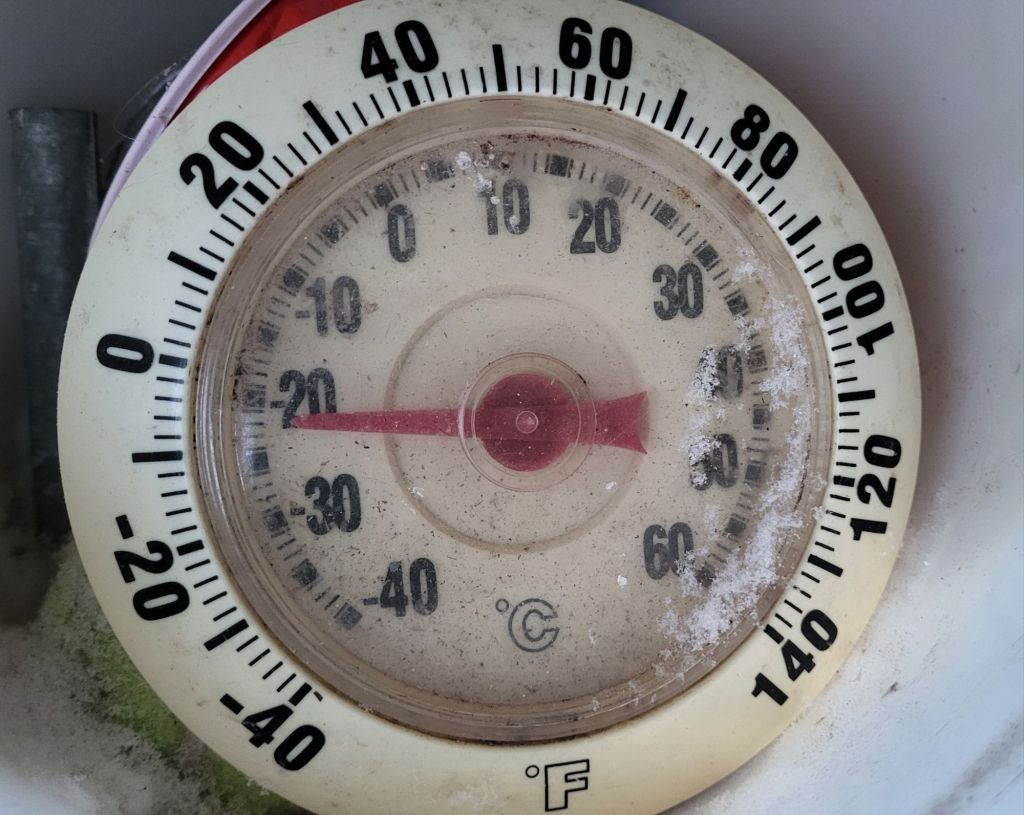
We gave up on keeping a thermometer in the cat house, as they kept knocking it down, but I’ve left it outside, in the top of the shelf shelter, so it’s completely sheltered from wind and sun. I remembered to check it this morning.
-21C vs -24C isn’t much difference on a thermometer, but there’s a difference when you’re in it!
The sunroom thermometer was just below zero, still. I noticed there was no food at all left in the sun room, and the heated water bowl was low, even though it was refilled last night, but there was still plenty of food outside. The big heated water bowl was quite full, too. I could see cats in the window of the cat house. Clearly, they are staying indoors as much as possible! I do still see cats coming out from under the storage house. The remains of the basement under there would provide decent shelter, too.
It could be a lot worse, though. We are expecting a high of -17C today. The roads have been plowed, and I hope to get to my mother’s to do some grocery shopping for her. The city we used to live in, however, is expected to hit temperatures of -41C! That’s before windchill, too! That’s just deadly cold.
I tried to go to bed early last night, but of course, things messed that up.
One of those things was the phone.
With the line repaired, I returned the phone base to my bedroom/office. I set it up in a different spot on my craft table, where it would be more visible while I was in bed.
Which is why I saw the blinking red light.
Yup. The “hold” light was blinking again.
I picked up to check the line, and got just a crackling noise.
The bottom of the handset was also wet.
I grabbed some paper towel and found that where the handset rests in the base and charges had a puddle.
There was even a small puddle under the phone, which I could not see until I moved the base.
Now, my first thought is, a cat peed on it. But I’m not sure how. For starters, there was no visible sign of it. How can a cat pee into the phone base, without peeing on the handset? There was also no smell, and the puddle underneath looked like water. Plus, there was no space for a cat to position themselves in such a way as to pee on the phone without knocking things all over.
The alternative is that somehow, my bedside water bottles spilled, but those were still closed and upright.
So it had to be a cat, yet couldn’t have been a cat. !!
I took the whole thing out, cleaned it up as best I could, then set it aside to dry. Then I used a corded phone to test the line using the jack in the living room.
Still crackling.
So a job for today would be to call the phone company again. Before starting this post, I was going to try doing that from my cell phone. My husband went through it, trying to figure out why the wifi calling wasn’t working on my phone. He ended up doing a reset somewhere, and that seems to have done the trick.
Before calling, though, I checked the phone.
We have a dial tone again.
I want to test the other phone and see if it’s still working, but my guess is, it will need replacing.
We need to have a working phone, though. My husband has a phone appointment with his doctor today. He primary pain meds are getting hard to get, so his doctor wants to try him on something else.
Something that actually works better would be nice. Still, even that could be worse. At least it takes the edge off his pain enough to function, somewhat.





 The Re-Farmer