$623.68 to be exact.
Ouch.
Today I did our first stock up shop in the city. While our temperature is a balmy -6C/21F, the windchill is brutal. My weather app says it feels like -22C/-8F, but at least a few times I was walking in it, it sure felt much colder!
The drive in was good, though. Swirling snow on the highway, but the wind wasn’t letting anything accumulate.
I decided not to do Costco today, in order to take advantage of some sales that end tomorrow. My first stop was at the international store, where I could first enjoy some dim sum for breakfast.
I didn’t feel like bagging at the truck with this wind, so I brought bags into the store with me, for a change.
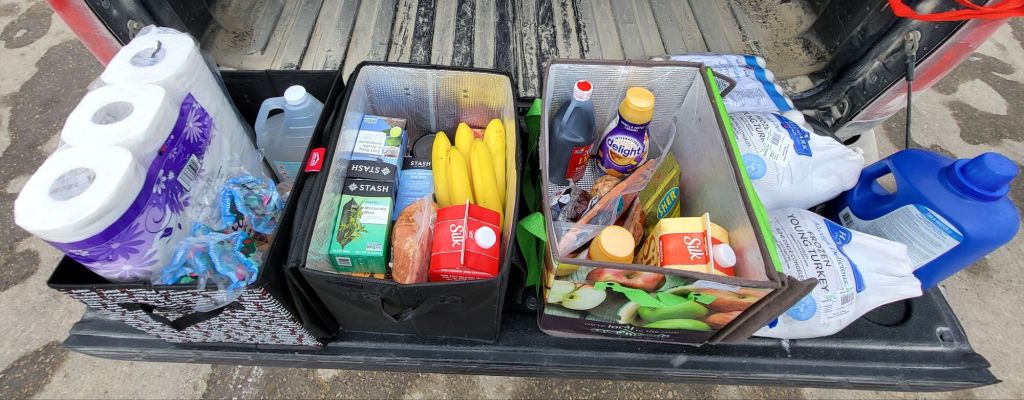
I balanced the weight in the insulated bags poorly, though, so I shifted things around a bit. This is what I got.

For our Easter basket, I picked up a flat of eggs. We’ll get more at Costco, but I want to get some pickling right away. I also got a Polish sausage, a cheese ball, a jar of cheese stuffed olives and a small dinner ham for the basket. Oh, and the whole cloves, which are used as a decoration. We’re running low.
The frozen turkeys were on an excellent sale, so I grabbed two – and then got one of them for free with my loyalty points. The Honeycrisp apples were also an amazing sale, so I got two bags of those. They were $1.99 each instead of $6.99.
The Stash teas were also on sale, and I ended up getting 4 boxes of those altogether. We normally buy our toilet paper at Costco, and we still will get their big house brand package, but the house brand TP here was also on a good sale, so I got one for our stock up supply.
There’s some cleaning vinegar (10% acidity) and laundry detergent. Normally, I’d by detergent at Costco, but I don’t normally do the laundry and hadn’t realized we’d run out completely! I got some marble and Old Cheddar cheese as well, because the sales were good, but will likely get more at Costco. We use cheese a lot.
The Soy and Oat milks are for my lactose intolerant daughters, along with the coffee creamers, which does bother them, but they don’t use enough of it at a time for it to be much issue. I got a smoked ham for general eating, plus a slab of salmon for the girls that was on sale. There’s a slab of smoked bacon, the soy sauce brand my husband likes, and some bananas.
The grand total, after taxes, was $216.10, after just over $50 was taken off for the sales and deals.
My next stop was Walmart. I was really after just two things there. Cat food and supplements.

I did have a few extras that weren’t on my list. My “splurge” of the day was a small plastic shelf and 4″ plastic plant pots. I really didn’t want to use peat pots again and, with the larger seeds I want to be starting next, I went with these. I do have similar plastic plant pots that we found while cleaning up the basement, but they’re pretty old and the plastic is getting brittle, and the price was right on these. They had the giant bottles of shampoo and conditioner in stock, so I got one shampoo and two conditioners.
Then there was my supplements.
*sigh*

I got two boxes with 32 tins each of wet cat food, plus 6 bags of dry. The two more expensive kibble bags were about 9kg, and the others were 7.24 and 7.5kg in size. I also grabbed a couple of small bags of chocolate eggs for our Easter basket – our one non-traditional basket item is a bit of chocolate. I had run out of my supplements almost completely, so I got my magnesium, B12, Zinc and D3. D3 is the only one that was cheap! With the others, I did get the ones that were the best deal, so they should last me a while, but… ouch.
Those plant pots were a really good deal, and not even on sale. A package of 6 was $1.24, so I got four packages.
Aside from all that, I got a bottle of water for the road, for a grand total of $410.22 after taxes.
*sigh*
I’ll be doing our Costco shopping in a couple of days, and I want to make sure to tank up and get everything we can squeeze out of our budget, because on April 1st, our Prime Dictator’s new carbon tax is coming into effect, and the price of everything is going to go up. Another tax on top of a tax on top of a tax. Meanwhile, all our MPs are getting a raise on the same day! Because, of course. 🫤
On the way home, I made sure to hit a bank machine and take cash out, then stopped at the septic guy’s place to pay him for emptying out our tank yesterday. Including a tip. I will always tip the septic guy!
While driving on the highway, on the lookout for his driveway, a thought occurred to me. When I called him to do our tank and arrangements were made, he never asked for our address. He’s been here often enough to remember where we are!
When I got there, I met the lady of the house and had some questions. The guy was in their shop out back, so she called him and he came over to talk.
I told him that the septic pump it still not shutting itself off and asked what he could see while emptying the tank. The first thing he confirmed for me is that he saw nothing at all out of the ordinary. The float was not stuck.
Then he told me, it’s the pill starter. It has to be, because there’s nothing else it could be! I mentioned I’d talked to my brother about it, and that it had been changed relatively recently, but the septic guy said this is actually a pretty common problem. He was able to tell me that a new pill starter costs about $250. We won’t have a budget for that until I get my caregiver tax credit in, so for now, we’ll have to just turn it on manually every now and then. He told me that we shouldn’t need to turn it on for at least a week. That’s about how long it takes for both sides of the tank to fill. I’m glad he told me that, because I was concerned about running the pump dry, but I don’t really know how big the two sides of the tank are. Given our use of our plumbing system in general, I would still expect it to be filled faster than a week. He said to just take a look on Monday and see if both sides are full, then turn it on if it is. I won’t be doing that. Every time I look down into there, I’m afraid my glasses will fall off! And no, they are not loose or anything. I get that feeling every time I look down from a height. 😄
Then he mentioned that he could come out next week and replace it for us, before we’d need to turn the pump on again. I didn’t realize he did that sort of thing, too! I thought we’d have to call a plumber! Nope. Apparently, it’s a pretty easy thing for him to do. I suspect he wouldn’t be doing it the way my brother changed it out, before we moved out here, which was through the basement.
No matter. I would much rather get the septic guy to do it than call a plumber! I’m just really happy with this guy. He’s come out here when we’ve had septic problems several times now, and always been really fast about it. The last time we called to book the tank to be cleaned, my husband accidentally called a different company, and they wouldn’t have been able to come out for 2 weeks! They would have been a lot cheaper, but I’d rather pay extra for a guy that’ll come out when we actually need him. The cheaper rates are made possible because they arrange their schedules to do a whole lot of people in one area at a time, so there’s less driving around for them.
So that was done, and now we have more information to work with.
After I got home and everything was unloaded and put away, I assembled the small shelf I got. It’s for the cats. There’s a space in my room that currently has a stool over a circulation vent that has a cat bed on it. I want to replace that with the shelf, and set up four cat beds on it.
I found a problem as soon as took the straps off the package.
Along with the side pieces, there are foot pieces that each have a cap piece tucked into them.
There’s only three foot/cap pieces.
Without all the legs, I can’t put it over the circulation vent, so I ended up putting it on top of the foot stool that’s already there.
This must be pretty common, because it came with a sheet saying, “missing parts? or questions? DO NOT RETURN TO THE STORE to obtain replacement parts.” 😄 There’s a website to go to instead. This isn’t the first time this has happened. A few years back, after we finished clearing out the old basement, I got larger plastic shelves to use down there, to replace the wooden ones that were rotting from the floor getting wet every spring. I wrote to the company and got the missing parts very quickly. I’m pretty sure it’s the same brand.
Once we get the missing parts, we’ll set it up without the foot stool under it, and secure it to the wall more effectively. We’ll probably wrap the verticals with jute twine, too, for the cats to scratch at.
Meanwhile, I’ve got cat beds, caves and blankets on it now, and the cats have been exploring it. sometimes, even staying on it for a while.
They still prefer gathering into massive cuddle piles on my bed, though!
Which is fine. That’ll give me a chance to wash the cat beds and blankets, so they’ll be fresh and clean for tonight.
But first, I need to contact that shelf company about the missing leg/cap piece!
The Re-Farmer