The weather system has stalled over Ontario which, for us, means that the winds have actually reversed; Instead of coming in from the west and slowly cycling to the north, it’s swooping in from the east and swinging to the south. The entire system is covering the south end of three provinces (well, four, really, but it’s just barely touching one) and at least three states with snow, switching to rain to the east.
We’re just on the norther edge of the system, and seem to be getting more gaps between snowfalls, but there is still heavier snow expected.
The winds have increased, but we’re still at a very mild -4C/25F with a wind chill of -14C/7F.
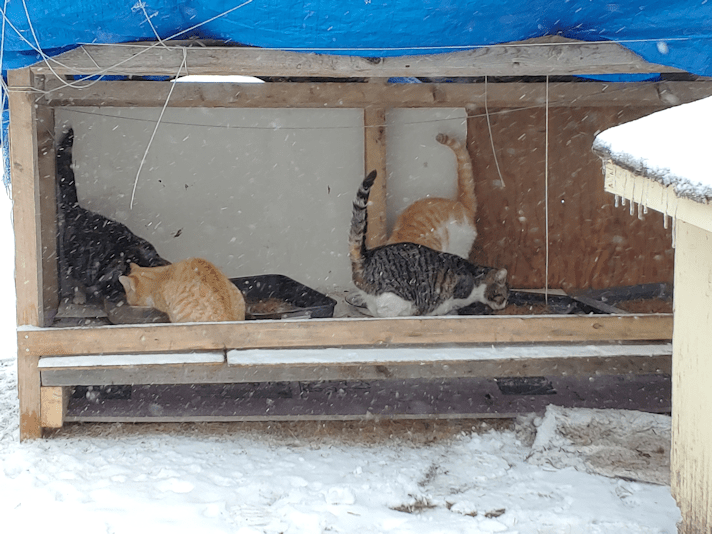
I saw Junk Pile watching me through the window when I came out, but had to take a photo when I saw through the other window, that Nutmeg and Creamsicle Jr. were snuggled up under the heater bulb, I just had to take a picture! By the time I got my phone out, though, Nutmeg was at the window, checking me out. :-D
Smart kitties know where the warmth is!
I saw Butterscotch, too. I don’t know where her hiding spot it, but it’s not usually in the inner yard.
While switching out the trail cam memory cards, I remembered to get this picture.
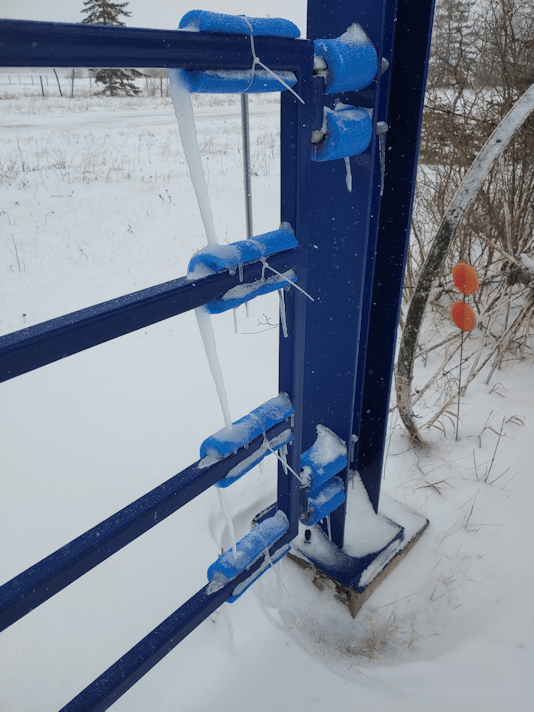
We had started out with rain, but these icicles formed on the bumpers only on one side of the gate. There’s even icicles inside the gate post, at the ends of the hinge bolts!
The temperatures are expected to stay pretty constant, dipping only a degree or two overnight. By the end of today, they’re saying we may have a total of 20-35cm of snow. (8-14 inches) We have about 8 inches now.
The sun room, meanwhile, is staying steady at around 10C/14F. The onion seedlings, with their heater bulb below, are doing just fine in there. Of the various seeds that needed to be started this early, they’re easily the hardiest.
As I write this, the snow has stopped, but from the looks of the weather radar, we’ve got a patches of heavy snow about to hit us. Mind you, according to the radar, we should be snowing right now, so… we’ll see what happened.
Either way, I’m glad we don’t have to go anywhere, we’re warm inside, well stocked, and hunkered down. This is a good time for me to catch up on some crochet! :-)
We’re still getting a mild snowfall, off and on. My younger daughter and I made a quick trip to the post office, and the roads were pretty slushy. My husband had prescriptions refills ordered on Friday that were to be delivered today, so when we got the call that they were on the way, I made sure to unlock the gate and shovel the sidewalk. It’s a very damp, heavy snow we’re getting right now, because it’s just a few degrees below freezing.
The delivery driver had just come by and I’d quickly run out to lock the gate – sans coat, because it was that warm out there – was back inside, boots half off, when the phone rang. No one was near a phone to answer it, so it went to machine. I rushed over to pick up for whomever it was, only to discover it was a robot call.
From Environment Canada, with a snowfall warning!
So I stayed and listened to it. Since moving out here, we have never had a call from Environment Canada with a weather warning!
The expected snowfalls are now expected to be 15-20cm (6-8 inches) in most places, but some might get as much as 30cm! (12 inches) There were plenty of warnings about road conditions, visibility, and a number to call for those people who would not be able to make their retrovaccine appointments. It even included an email and twitter hashtag to report severe weather conditions. It was the exact same thing that is under my phone’s weather app alert.
We’ve had some pretty wicked storms since moving out here, and it really makes me wonder what triggered them to have the automated calls to start going out! I think this part of the alert is why. “There is still some uncertainty with the exact amounts as several waves of accumulating snow are expected through the end of Tuesday.” So… they really don’t know what this weather system is going to do – they hardly even refer to it as a “storm”. The winds are not particularly severe, and the temperatures aren’t going to be dropping much, even overnight.
Well, my husband has his medications – even his bubble packs, which he didn’t think he’d be able to get for a couple more days, the larder is full, and any of the places we need to go can wait.
Including the pharmacy. They forgot his insulin, but he’s got enough for a few more days. When he called them about the missing insulin, he made sure to add that, with the road conditions, we’re not expecting them to deliver it! It’ll be ready for pick up on Thursday. By then, the roads should be cleared, and the snow starting to melt away.
I’m still just surprised by the call! And appreciative. They would only be calling land lines, which means my mother would have gotten the call, too. Not everyone has cell phones or internet!
Well, the forecasts were actually right for a change!
Somewhat.
When I checked the forecasts last night, they were suggesting the southern areas of our province might not get any snow at all, or if they did, it would be just a bit. The system was expected to hit more of the Northern areas of the province. The city, in particular, was predicted to get maybe a couple of centimeters of snow (about an inch).
We’re more central, so either of those forecasts could have included us, but we should have gotten at least a little snow.
When I checked the weather radar this morning, the system was over three provinces, and their bordering US states.
What caught my eye in all the blues of snow was the circle of pink and purple directly over the city. Pink and purple denoting severe weather. So while the rest of us were getting an ordinary snowfall, the city – and only the city, at that time – was getting a storm!
It has since moved on, but the area of snow is still over us, and it will continue through tomorrow.
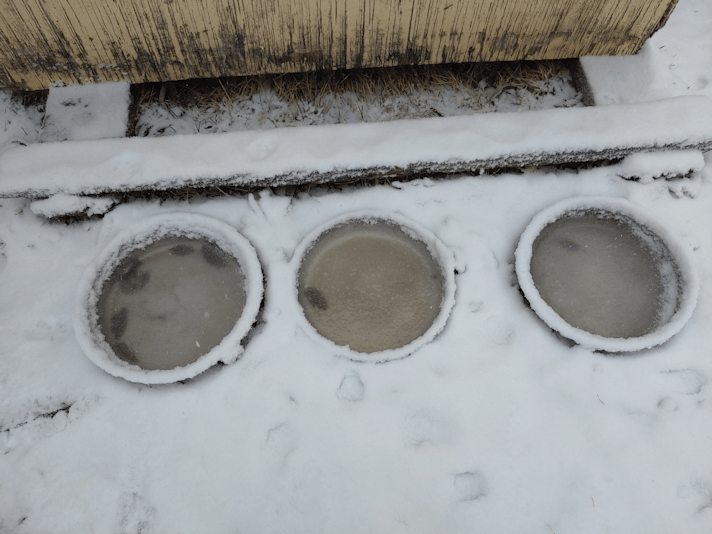
We started out with rain, yesterday evening, and it was still warm enough that the cat’s unheated water bowls did not freeze overnight.
They just got slushy with snow!
The outside cats were more than happy to be out in the weather once their kibble bowls were filled again! Even Junk Pile cat almost came close to me!
Their bowls are completely empty every morning, after nightly visits from skunks. I’ve only seen one, once, when I popped outside at night to investigate something, and found it inside the kibble house. They can get in easily enough, but they have a harder time getting out, over that board that keeps them from knocking the bowls out, with their short little legs. We catch a whiff of their presence in the night, fairly regularly. I don’t mind them too much. Sure, in the summer, they dig up holes in the lawn, but they’re eating up the grubs, and the divots can be put back. Still, cat kibble is not good for them, so we don’t refill the food bowls in the evenings anymore. It means that cats are pretty hungry by morning, though. :-(
We may be getting snow, but we are still just barely below freezing. Our expected high for today and tomorrow is -3C/27F. Today, we’re supposed to get between 6 and 12 cm of snow (about 2 1/2 to almost 5 inches), and another 2-4cm (roughly 1 – 1 1/2 inches) tomorrow.
In the sun room, however, it was nice and warm. The thermometer was at 10C/50F, though with the heat under the seedling trays, they would have been a bit warmer than that. No danger of them getting too cold in there!
The snowfall was pretty light, this morning. Changing up the memory cards on the trail cams was a bit funny. I could really tell which way the wind had been blowing! One of the trail cams had its front face covered with snow, and under that was a layer of ice that I had to scrap off the lens cover and the motion sensor. It still managed to record some videos, though! The other camera’s front was clear, but one side was coated with ice and snow. The side with the latches to open it, of course. ;-)
I’m really happy with what we’re getting right now. The temperatures are still mild. There’s no deep freeze expected, and no high winds. While there are a few patches of severe weather in the system, they’re not anywhere near us. We’re just getting the snow. Looking at the long range forecasts, the temperatures will rise just above freezing for the next while, and we’re even expected to get more snow as we go into May, which means a slow melt, and all that precious moisture is going to be absorbed slowly into the soil, rather than being washed away. This is exactly what we need!
The girls and I have been paying particular attention to where we planted all those bulbs and corms last fall. With it being so dry, we were concerned. We planted 200 grape hyacinth and another hundred crocuses. The crocuses in particular should be starting to poke through, and even blooming, while snow is still on the ground. We’ve had so little snow this past winter, though. Add in the tulips and irises the girls planted – with the tulips coming with instructions saying NOT to water them! – and it’s hard to guess how many have survived the winter, and the very dry spring we’ve had so far. Getting that polar vortex with so little insulating snow on the ground certainly wouldn’t have helped.
Well, we won’t know how they are for some time yet. If they survived the winter, this snowfall will be a huge boost for them.
I am really happy to see this snow. If things keep up like this, the fire bans might even be lifted. Some local farmers had managed to do controlled burns earlier, but the more of those that are done, the less wildfires we need to be concerned about later.
Today turned out to be such a hot and sunny day, I took advantage of it to do a bit of work in the spruce grove. Specifically around the dead trees near where we intend to plant the mulberry tree that will be shipped later in the spring.
I normally post the before pictures at the start, and the after pictures near the end, but this time I’m going to set them side by side. It’s the only way I can see the difference 2-3 hours of work resulted in. :-/
Here is the first area, and where the mulberry tree will be planted.
They’re a bit hard to see in the before picture, but there are two steel wheels leaning against the reddish dead tree. Those have joined the “found object” art display for now. ;-) Then there was the remains of what appears to have been a bench made with two logs as support, and another log that I think was just there to sit on.
It must have been a very pleasant place to sit, when they were first set up.
Someone (probably my mother) had gone to some effort to make sure the seats were stable. I found these, under them.
These were under where the bench was, with a group of bricks under where each log would have been. It was a good idea to put the bricks under the logs, but nothing had been done to keep them from sinking into what is essentially composted leaves and spruce needles, so the logs started to rot from below.
It wasn’t until I found these that I realized the other log was intended as a seat, too.
I had to cut away what I thought were two small trees, just to access the area. It wasn’t until I tried to cut them down to ground level that I realized, it wasn’t two trees.
I had to dig out and cut away the roots to get them out, and they were both growing out of the same root, which ran under the bricks.
This was, hands down, the most difficult part of the clean up today. Partly because there were other roots running under the roots I was trying to cut! Some belonged to the dead spruce they were next to, but I later ended up pulling out about 8 feet of root, and never finding out what tree it came from!
While trimming the undergrowth, I realized I need to get thicker gloves than the gardening gloves I’ve been using.
Another reason to encourage the wild roses – they make great security barriers! Those spines go right through ordinary garden gloves!
I don’t mind cutting away the roses for now, though. They will grow back, and with clearing out the other stuff, they should have more sun and space to spread out, too.
It was really hot work, though, so I stopped for a rest in the shade. I look forward to when we set up new seating areas around the yard. It would be much more pleasant than sitting on concrete steps!
With how hot it was feeling, I just had to check the temperature. I was thinking we were certainly about 15C/59F Maybe even approaching 20C/68F
Nope.
It was 10C/50F
RealFeel, 8C/46F
Yeah. I know. You folks from the south are laughing at me right now! :-D
Meanwhile, the thermometer in the sun room was approaching 30C/86F. I opened the solid doors to allow air circulation through the screen doors, and increased the speed of the ceiling fan, so the onion seedlings would not be too hot!
One of these days, we should set up our own weather station, so we can have more accurate readings!
But I digress…
I did have a visitor while I was taking a break on the stairs.
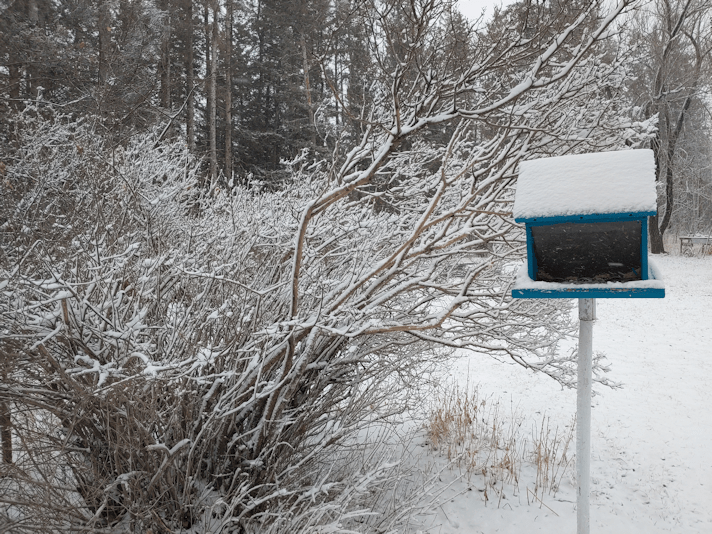
I love how the woodpecker likes to get to the seeds on the ground by way of the bird feeder’s support. :-)
Then it was back to clearing away the undergrowth, and working my way towards the stone cross. Here is that section, taken from the same spot I took the first before and after pictures from.
I’m having a hard time seeing the difference between these two pictures. In fact, the “after” picture looks worse, because I didn’t line the angle up the same. :-/ Trust me. I did take out quite a bit of undergrowth in the distance!
In the second picture, you can see the tarp covering the junk pile. The tree beside it is dead, as is the tree my supplies are under. That whole area is full of spirea. It’s better to pull those up by the roots, but I just didn’t have the energy for that, today. Too hot! :-D
I worked more into this area.
In the before picture, I’d already started cleaning up the undergrowth a bit. The row of trees you can see on the right are part of north edge of the spruce grove. My older brother planted those, before I was born. It’s hard to believe they were planted at the same time as the huge spruces on the north edge of the grove, but there were three rows planted, close together. The further into the grove the rows were planted (at a time when the rest of the grove’s trees were in their prime), the less light they got, and the less growth there was. I’d cleaned up along the north side of the grove, taking out a lot of little dead spruces in the process. Hopefully, the more things are cleaned up, the better it will be for the surviving trees.
Most of the large spruces in the pictures are dead, so once those are cleaned up, that will allow a lot more light into here. If their trunks are still solid enough, I want to turn them into supports for benches and maybe a table or two. Over time, more spruces will be transplanted into the spruce grove, as well as more food trees – the mulberry tree being our first – that need the extra protection these spruces will give them. The mulberry tree should grow quite large, and will provide quite a bit of shade, so we need to keep things open around where we plant it. Long term, I want this area to be a pleasant, park-like setting. I will have to keep in mind that the benches and possible tables that I hope to make on the tree trunks nearby will end up covered with berries when the mulberry tree gets bigger! I’ve read warnings that mulberry trees can be quite messy. :-D
I’m sure the birds will clean it up for us, though. ;-)
I probably won’t get a chance to work here again for a while, as we are supposed to start snowing tomorrow evening, and it will be a few days before the temperatures warm up again. I want to get the spirea out, in particular – they’re lovely, but very invasive, so we’re keeping them in one area of the yard, and taking them out everywhere else. I know some of what I’ve already taken out today were chokecherry trees. We have lots of those, and it turns out they can be invasive, too! What we really want to clear up around are the Saskatoon bushes. These ones are still healthy, and keeping the area around them clear and open will help keep them that way. They are crowded by spirea and chokecherry right now, so when I work my way to where they are, I will back off until they are in full leaf, or even starting to bloom, so I don’t accidentally cut any down, mistaking them for chokecherry.
Today has been a very deceiving day! It got so hot, and when I was shoveling around those roots, I didn’t hit any ice or frozen ground at all. Quite a few of our garden seeds say to direct sow “as soon as the ground can be worked.” Well, that would be now, but it’s still another month an a half before our last frost date. Not only are we expected to have snow starting tomorrow evening, but we could easily get more snow later in the month, or even in May, so anything we tried to sow would likely not survive.
Which is fine for now. We can’t do anything until the garden soil is delivered! I keep forgetting to call about it. I’m sure the soil is thawed out enough to load into their trucks by now, and I still need someone to come by so we can look at where would be the best places to drop the loads.
I get excited, just thinking about it! :-D The girls and I are so looking forward to gardening this year!
My daughter and I made a dump run today, and as we were unloading the back of the van, she noticed one of the access panels in the side of the van had fallen off. This is where the jack is stored. She popped the panel back on, and off we went.
As we were turning into our driveway, however, we heard a noise in the back that was rather alarming. At least for us, after having so many things go wrong on the van. So while my daughter unlocked the gate, I took a quick look in the back, thinking maybe something got knocked loose behind that access panel.
Once in the garage, I just had to get a picture of what I found.
The jack had been visible before, and we had seen part of the back with the pieces to use the jack. I think one of the plastic pieces I found was originally a bracket to hold the jack in place, so it wouldn’t get knocked about, but I have no real idea what it’s for. Then there was the pliers. And odd find, but I can go with that.
The child’s shoe, on the other hand, is a bit harder to explain! :-D I know the previous owners had kids – when I test drove it before buying it, and before it was detailed, there was still ample evidence to be found! :-D I do find myself curious how the shoe ended up tucked under the jack and the tools! :-D
First up, many thanks to Fyreglass and her hubby for all the help with my technical difficulties! So far, the problem hasn’t been solved, but my goodness, my computer is working much more efficiently! :-D
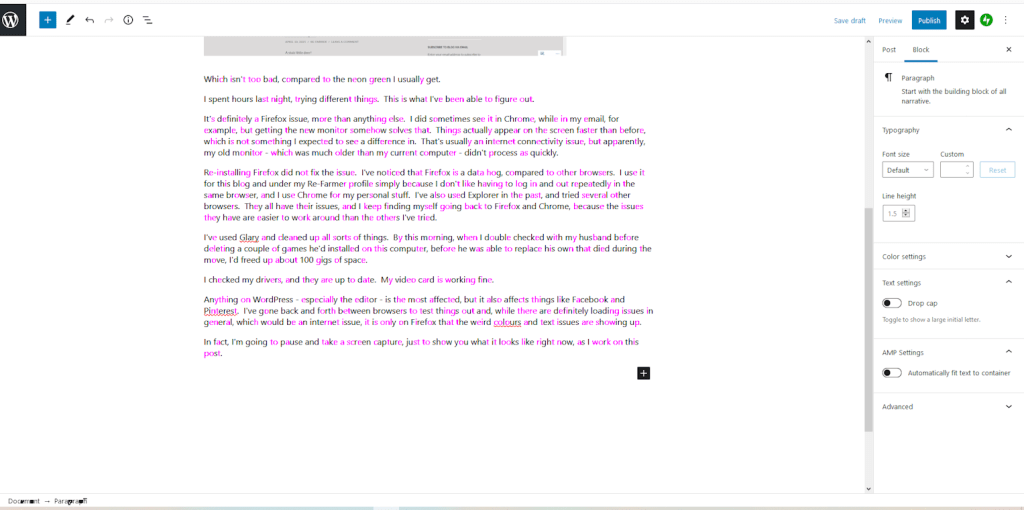
In fact, as I type this, the text is showing up as a combination of black and magenta. I am also still getting things like this.
Which isn’t too bad, compared to the neon green I usually get.
I spent hours last night, trying different things. This is what I’ve been able to figure out.
It’s definitely a Firefox issue, more than anything else. I did sometimes see it in Chrome, while in my email, for example, but getting the new monitor somehow solved that. Things actually appear on the screen faster than before, which is not something I expected to see a difference in. That’s usually an internet connectivity issue, but apparently, my old monitor – which was much older than my current computer – didn’t process as quickly.
Re-installing Firefox did not fix the issue. I’ve noticed that Firefox is a data hog, compared to other browsers. I use it for this blog and under my Re-Farmer profile simply because I don’t like having to log in and out repeatedly in the same browser, and I use Chrome for my personal stuff. I’ve also used Explorer in the past, and tried several other browsers. They all have their issues, and I keep finding myself going back to Firefox and Chrome, because the issues they have are easier to work around than the others I’ve tried.
I’ve used Glary and cleaned up all sorts of things. By this morning, when I double checked with my husband before deleting a couple of games he’d installed on this computer, before he was able to replace his own that died during the move, I’d freed up about 100 gigs of space.
I checked my drivers, and they are up to date. My video card is working fine.
Anything on WordPress – especially the editor – is the most affected, but it also affects things like Facebook and Pinterest. I’ve gone back and forth between browsers to test things out and, while there are definitely loading issues in general, which would be an internet issue, it is only on Firefox that the weird colours and text issues are showing up.
In fact, I’m going to pause and take a screen capture, just to show you what it looks like right now, as I work on this post.
WordPress is one of the platforms that I have the most loading issues with. Especially the editor, but just about every WordPress blog I try to visit has major issues, from the “like” button never loading, to the formatting going completely haywire, to simply timing out and not loading at all. Over and over and over again. Anything embedded in a post (like a video, or a reblog) generally fails to load, and trying to leave a comment is almost impossible. While using Chrome, the loading issue seems more limited to the editor and admin pages, than while visiting blog pages. The stats in particular reeeeaaaallllyyy don’t like to load, even though everything else around it (side bars, headers, etc.) will load just fine.
It’s not just WP, though. I get it in Facebook and Pinterest as well, though not as bad, nor as often. Since doing some PC maintenance, and my computer is working faster, I no longer have the problem in my gmail, as in the screen capture I’d posted yesterday. I might even be able to catch up on my emails now! :-D
And, just to make things even more confusing, it will often change, right before my eyes. For example, if you click on the above image to see it larger, check out the text in the bottom left corner. Before I took the screen capture, that’s what the text in my side bar on the right looked like. After capturing the image, then resizing it before uploading it, that text went wonky again. As I am writing this right now, the text in my side bar is messed up, not clear and legible, as it is in the image I screen captured just a little while ago.
Oh! Now it’s blinking back and forth!!
So now I’m thinking the problem is a combination of two things.
One: it’s a loading issue. Even though I have a WiFi booster (which I even moved to a different location, in hopes it’ll get the signal better), something about the corner my “office” is in does not connect with the internet as efficiently as other parts of the house.
The other is Firefox: while I have problems loading things on other browsers, it is only on Firefox that the weird colours and disappearing text is happening the most. Where other browsers just take longer to load, Firefox does the weird text and colours.
*sigh* I’ve even saved my draft and reloaded this several times while working on it, but that magenta text just won’t go away – and it’s only happening here, in my editor, as I write this. It’s not happening when I load a published post.
It’s getting very hard on the eyes, so I’ll go ahead and post this. I might have to just stop using Firefox and find another browser to use for my Re-Farmer profile. Trying to use the WordPress editor has been even worse in other ways, in the various browsers I’ve tried, which is why I kept coming back to Firefox.
*sigh*
The Re-Farmer
(ps: I just edited this post to fix a typo I missed, and the magenta text is gone, as is the weird blocky, unreadable text in the side bars. No consistency at all!)
Okay, so I thought my monitor was the problem, we got a new one, and…
The problem hasn’t gone away.
This is what my gmail looked like a little while ago.
I use the past tense, because when I go to another tab, then come back to it, I see the text, only to have all the text disappear when I try to click on an unread email.
It’s not just gmail. I went to another tab after embedding that image, came back, and now I’m seeing nothing but a neon green block instead of the image. Oh, and the text in all my tabs have disappeared (all WordPress blog posts I’m trying to catch up on), but the icons are still there.
So it’s not the monitor (though I do now have a bigger, better monitor out of it…). It does seem to have improved since I got it, though, which is odd.
I at first thought it was our crappy internet, but I’m the only one in the household having this problem, and it’s only on my desktop.
My husband thinks my computer might be the problem. While I think it’s possible, I don’t think it’s likely.
Is it WordPress not loading properly? WordPress always has more trouble loading than anywhere else, it seems. It does seem to happen almost exclusively on pages hosted by WordPress… except it also happens when I open my gmail.
Is it my browser? I use Firefox for this blog, and Chrome for my personal stuff (I’ve tried others but end up going back to these to, for various reasons). In fact, I just went to my other browser, logged into WP, and browsed around. Images still take forever to load, or sometimes don’t load at all, but I’m not getting that neon green thing happening. Nor am I getting the magenta text that sometimes happens. I also have no problems with my gmail.
Okay. So Firefox is definitely part of the equation. When things don’t want to load in Chrome, they just don’t load. If they don’t want to load in Firefox, I get weird colours or missing text.
Maybe I should try using Tor again. It had issues with WP’s block editor, but WP has updated since I last tried it. I’ll have to test it again.
So… It could be Firefox, plus our crappy internet, just messing me up with blinding green and magenta, and disappearing text that can only be read if I highlight it with my mouse.
Today, after being delayed for … two months? … more? … I was able to pick up the replacement hot water tank.
The current hot water tank is still working. There is no longer a puddle under it, though there is a scale build up along the seam of the bottom cap. It must be a small enough leak that leaving the panel off is allowing for evaporation to keep it from actually puddling anymore.
I went to a different town to get it; one we don’t normally go to. In fact, I’d forgotten the franchise the tank is from even had a location there. The location we’d picked up the last tank from has gone full mask nazi and doesn’t even allow the Mingle Mask or shields. I’d heard this town has been more sane. I phoned first, to make sure they had one in stock available for a warranty replacement. It took a while; I got the impression they don’t get warranty replacements very often! :-D
Once that was all figured out and I said I could be there this afternoon, I mentioned that I am medically exempt from wearing a mask. The guy I was talking to said that would be no problem, and that there were quite a few people in town that were also exempt, adding that it wasn’t their job to police people over it. That was very reassuring. When I got there, I walked in, everyone else was masked up, but no one said a thing. It was so nice to not be given a hard time or have to justify myself!
Once the paperwork was done, I drove over to one of their buildings in the back to pick it up. I got to chat with a really nice and interesting young man who loaded it into the van for me. He’d had me back right into the building, so when I got out, I found myself surrounded by stacks of plywood, which reminded me we need a couple of sheets to make a floor for the trailer frame my brother found tires for. I asked how much a sheet of 3/4″ plywood cost, and he got someone on the radio to find a price for me. It turned out to be about $145 for a single sheet! That’s just for the rough stuff. He told me the type that are smooth on both sides is actually a bit cheaper. !! My husband and price checked in the city, at a different franchise, and they were about $85 a sheet.
When my daughters worked for that particular franchise, before we moved, a sheet cost about $35.
Not only have prices gone through the roof, but supply is really low. He told me of people driving across three provinces to get the supplies they needed, because nothing was available closer!
It makes me wonder just how much more it would cost to replace our roof at this point. When we got the estimates, they were both just under $9000. Assuming that they would find damage under certain areas, for which both companies charged by the square foot to repair, we figured $10,000 was a reasonable expectation for the final amount. Of course, we don’t have that, and with so many unexpected bills over the past couple of years, saving up for it has been pretty much impossible. I hope that, by the time we do find the money, the supply issues will be resolved and prices will become more reasonable!
During the drive to and from this town, I noticed something interesting. This town is about a half hour’s drive north of us. Not that far. Yet, I could still see quite a few patches of snow that haven’t melted yet and – most encouraging of all – water! There were several ponds that were almost full, and even standing water in some ditches. It was nice to see that not everywhere is quite as dry as we are!
But I digress.
We have the new tank, and it awaits installation. After having the same thing happen to two new tanks, we’re tempted to keep using the leaking tank for a bit longer. Even if it’s just for the summer. I wouldn’t want to lose hot water in the winter again!
My older daughter just finished a whole bunch of quick commissions, and after sitting at the computer for so many hours, she really needed to get out and walk!
So we headed out together, and wandered around beyond the outer yard, cutting through the old hay yard.
I just had to share this photo of a floating tree.
This tree is a bit of a mystery. It is one of several trees that had not fallen on their own, but were cut down and just left in the hay yard. Perhaps the intent was to clean them up, but it just never happened. Who knows?
This tree, however, has a piece missing.
Unlike the others that were lying near their stumps, there is what I estimate to be about 8 feet of trunk missing. The nearby stump is much wider than the cut end of this tree’s floating remains. There is no sign of the missing piece, anywhere! I find myself curious as to why someone would remove a section completely like that, and what it was used for!
While we were walking around, my daughter asked her if I’d seen the old outhouse.
…
Which old outhouse? I had to ask, since several came to mind.
Apparently, there was an old outhouse my daughters found in the bushes.
So of course, I had to see it!
You know how you can walk past something time after time, yet not “see” it, until something calls your attention to it? And then you wonder, when did that get there? Or, is this new?
I had to have had this sort of situational blindness, because I’ve gone through this area several times, and yet I can’t remember seeing this. It’s in the bushes, between the car graveyard and old gravel pit, and most definitely has been there a long time!
Truly an odd place for an outhouse. It’s not like this was a place people spent so much time, they’d need an outhouse!
The use of wood shingles for siding like that is another curious thing. Very unusual.
It’s possible I missed seeing it because I’d gone through here at a time of year when the bushes were in full leaf.
At this angle, you can see the hinged door at the bottom, for access to emptying the… contents.
There does not seem to be a pit under it.
I wonder if it was brought in from somewhere else, and just dumped here, like so many other things were, over the years?
The roof is gone and it’s collapsing into itself to the point the door cannot be opened, though it is somewhat ajar.
I was able to stick my phone into a gap and get a photo of the inside.
I’m guessing that little blue shelf was hanging on the nails under the coat hook.
What a curious thing to have somehow not seen while going through here! Or perhaps I did see it, but just dismissed it. There have been so many odd finds since we’ve moved here, they aren’t really odd anymore! :-D
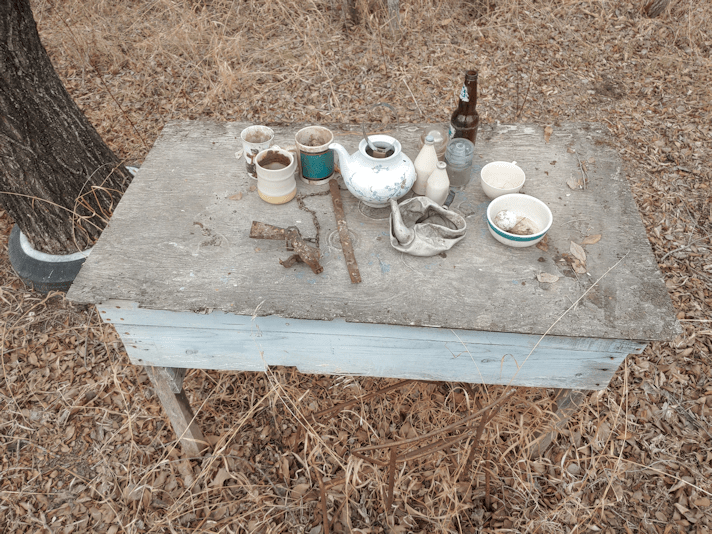
While doing my evening rounds, I figured it was time to get a recent photo of our found object “art” display. ;-)
The table itself was dragged out from under a fallen tree while clearing the edge of the spruce grove. We weren’t able to get at it until the old wood pile was cleaned up. The chair frame (barely visible at the bottom) was found somewhere else in the yard.
My daughter showed me where they found that crushed tea kettle, and now I’m even more perplexed as to why it was there and how it got crushed. Being driven over is not as likely as I thought, since it was in between some trees, where no vehicle – not even an ATV – could fit. The steel trap and the strip of rusted metal beside it was buried in the dirt under where the wood pile used to be, found while clearing out roots to turn the space into garden beds. Quite a few of what’s on there was found while cleaning up that old wood pile! The beer bottle was found along the East fence line along the spruce grove, most likely left there by my late brother. He did like his beer! The group of three cups to the right of the tea pot, plus the two Old Spice bottles, are the newest additions, found by my daughter in the junk pile way out by the plowed field.
While walking around and thinking of the things we need to do, and what we need to do it, I decided to drag something out of one of the sheds. We’d seen some wire mesh fencing rolled up in a corner, and I thought it might be useful for when we build our trellises or something. So I moved a few things to get to the corner, dragged it out and brought it to the house.
I was really surprised. There is a LOT more in there than I thought there was. As far as I have seen, we don’t have any fences made with this wire, so I have no idea why it’s here or what it was used for. Whatever it was for, not much of the roll was used!
This will come in very handy.
This morning, after switching out the memory cards on the trail cams, I took another look at the fence by the gate post, where we want to put in a small people gate. The gate post itself has three holes in the steel where we could potentially attach things. At the moment, the ends of the barbed wire are attached to the post through these holes. We’ll have to put in a new post first, attach the wire to the post, then detach the wire from the gate post. We still need to settle on how wide we want the gate to be, before we know where to put in a post.
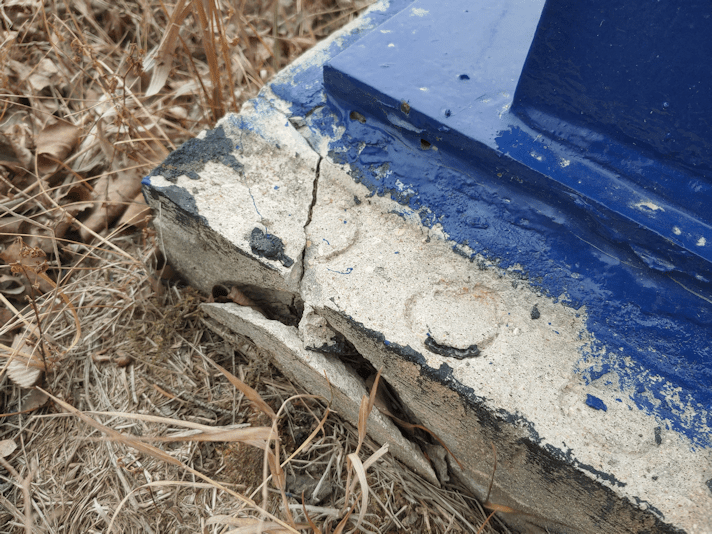
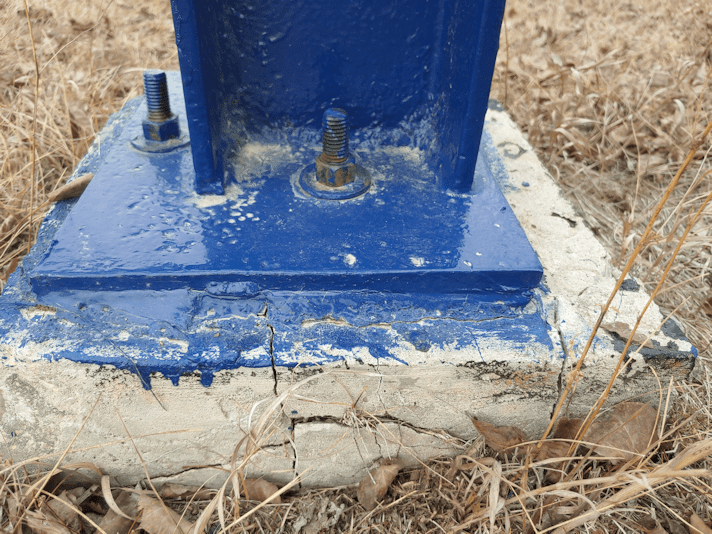
While looking at where the barbed wire was attached to the gate post, I noticed this.
*sigh*
It wasn’t like this in the fall. This is damage from temperature fluctuations over this past winter.
I checked the other sides, and the other gate post. The other gate post has no cracks in the concrete at all, but this one…
These are the two corners of the south facing side.
These are the west and east facing sides.
I don’t know that these can be patched, or if the base needs to be replaced. I recall my brother telling me about a particular type of concrete he wants to use to repair the cracks in the bottom portion of the barn wall, that could probably be used on these cracks. I will bow to his greater knowledge and ingenuity on this one!
Well, this does show which post was responsible for the gate shifting. When we hung the gate back up after repairing our vandal’s damage, it was level. Over the winter, it shifted enough that the pin for the sliding bar could no longer be used. By the end of the winter, however, the gate shifted back, and the pin can be used again. My daughter had thought it was the other gate post that had shifted, but with these cracks, I’d say it was this one!
Since I had to slip through the fence to get pictures on all sides of the gate post’s base, I decided to check out the fence line from that side. New fence posts had been put in until just past the end of the spruce grove. The rest of the fence has been slowly falling down. From the outside, I was able to shift the posts – they are so rotted, they’re broken loose at ground level – so that they were leaning into the yard, rather than towards the road.
The entire stretch of fence is basically toast. I think there might be one fence post that isn’t broken. At one point, I noticed a large tree had fence wire on either side of it. One of the wires had a break repaired. It looks like, when the break was fixed, whoever did it deliberately put the wire on the other side of the tree, so the tree would keep the fence up.
For that spot, at least, it’s working.
I will have to prioritize cleaning up along this fence line, so it can be repaired. We’ll need to pick up more fence posts; I’ve found some scattered all over the place, but I don’t think there are enough, and they’re different sizes, too.
My daughter just popped in and we talked about the fence. If we were just replacing a post or two, we could make do with the old post hole diggers we found around the property. However, there are just too many posts to replace for that to be practical for us. We’re not that able bodied! And since the equipment that we could have used is gone (the Bobcat had a soil auger attachment), or no longer functional (the post pounder my late brother built), we figure it might be better to just hire someone. All we really need is for the posts to be installed. Once they’re in, we can do the rest ourselves. Since this is a permanent fence line, we would also want to not just have posts in dirt, but to install them in such a way that they won’t rot away as quickly.
We also want to move away from barbed wire, so we would probably want to install posts closer together, and use other materials. We might start off with the “rustic look” and use materials on hand to make a simple rail fence, until we can come up with something more durable and permanent – and preferably deer proof!
But first, that section of fence line needs to be cleared. We’ll lose a lot of privacy in the process, but once the corn and sunflowers are grown in, that will suffice for the summer, at least.

















 The Re-Farmer